

The Global HR Platform You Need is here HR365 - HRMS
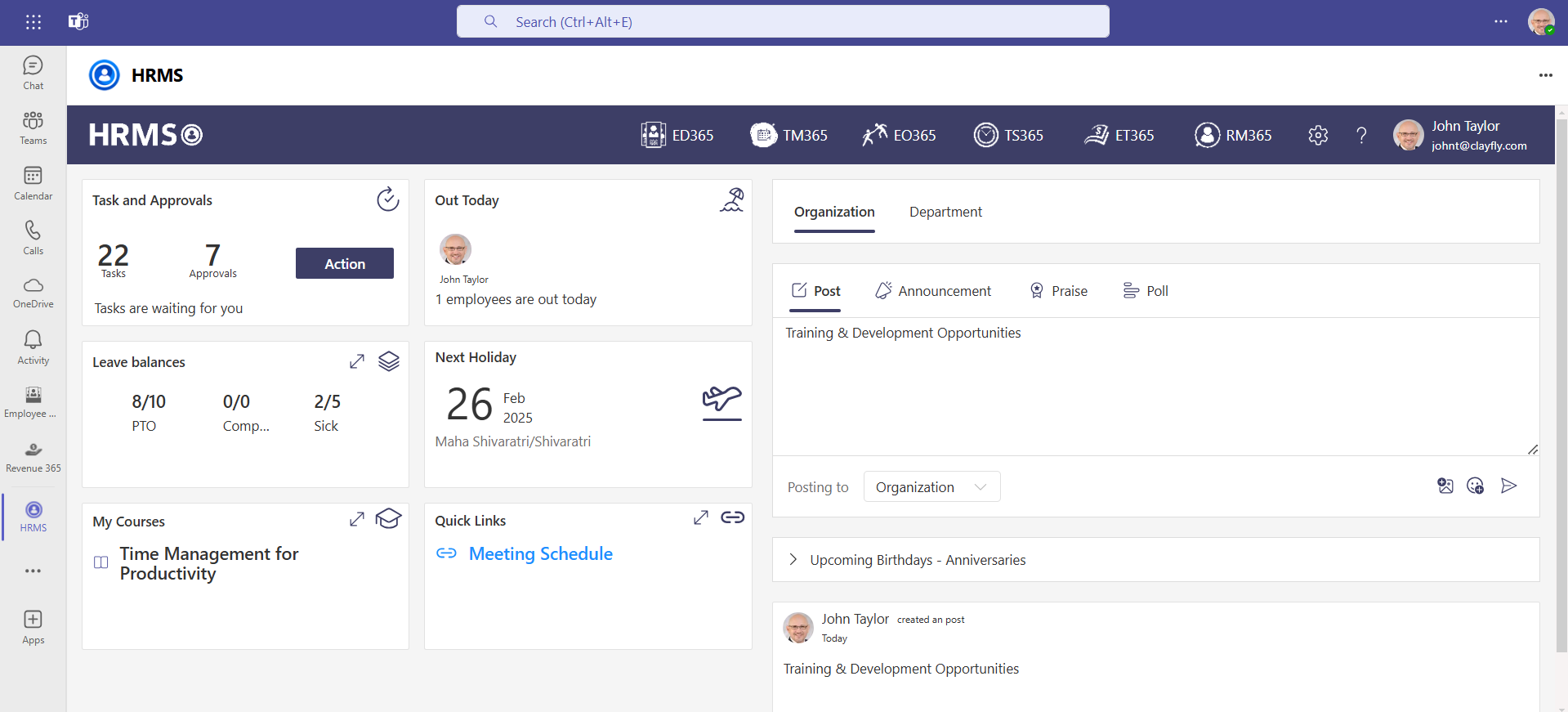
HR365-HRMS simplifies HR tasks with employee management, hiring, onboarding, expenses, leave, and learning tools for efficiency.

Trusted by 11700+ businesses from 167 countries













Tired of using multiple software for your daily HR tasks? Now explore HR365 - HRMS, All in 1 Solution for your complete HR management needs
Best HR Management software is about people, not just technology. It enhances talent management, workforce optimization, and productivity with centralized employee directories, automated hiring, seamless onboarding, expense management, leave tracking, and learning & development tools.
Why Choose HR365-HRMS?
HR365-HRMS simplifies workforce management and enhances employee success. From hiring to retirement, streamline HR processes, develop talent, and keep your team engaged all in one platform.
Cyber Security
Cyber Security in GCC & GCC High within the Microsoft environment places high importance on stringent measures to protect sensitive government data, ensuring security with robust defenses and Microsoft applications.
GCC & GCC High
Our apps are built for GCC & GCC high tenants of US Federal clouds.
SOC2 Type II Certified
Our apps ensure security, compliance, and data protection
MS Azure Marketplace
Our apps are tested by Microsoft and available on MS Azure Marketplace
Microsoft Appstore
Our innovative applications are available on the Microsoft Appstore.
Customer Support
Your Support Team merges technical prowess with sincere care, fostering trust through expertise and empathy. They build lasting relationships, transcending mere service to create meaningful connections.
AI Enabled Apps
Our innovative apps are built with the options of Azure AI, Copilot, and custom AI solutions.
Swift Deployment
Choose any deployment method—Teams, Outlook, or SharePoint—that suits your preferences.
Modern UI/UX
Every app is crafted using the latest Fluent UI, ensuring seamless functionality across all devices.
Free Updates
Our valued subscribers enjoy unlimited support, enhancements, features, and updates.
Microsoft HR365-HRMS Stands Out
HR365-HRMS transforms traditional HR processes into a smarter, more efficient, and employee-centric experience.

Smart Employee Management
Maintain a centralized employee directory for quick access to profiles, job roles, and organizational hierarchies, ensuring better workforce visibility.
Effortless Recruitment & Onboarding
Optimize talent acquisition with automated hiring and seamless onboarding via digital documentation and training.

Expense Tracking & Reimbursement
Automate expense approvals, monitor spending trends, and ensure smooth reimbursement processing, reducing administrative hassle.
Time-Off & Attendance Management
Simplify leave tracking, automate approval workflows, and get real-time insights into employee availability to improve workforce planning.
Integrated Learning & Development
Empower employees with learning management tools, training courses, and progress tracking to enhance skill development and career growth.

Seamless Microsoft 365 Integration
Sync with Microsoft 365 apps for better collaboration, communication, and document management, making HR operations more efficient.
Benefits of HR365-HRMS
Streamline HR processes, boost employee engagement, and drive productivity with an all-in-one workforce management solution.
Rapid Onboarding
Unlock powerful salary tools, real-time data, and seamless e-contracts in one place. Simplify onboarding with effortless efficiency!
Boost Employee Recruitment
Attract top talent with AI insights, automated workflows, and real-time analytics. Streamline hiring for faster decisions and better candidate experiences.
Manage Employee Data
Effortlessly manage employee data with real-time access, automation, and advanced security all in one hub.
Streamline Travel & Expense Management
Streamline reimbursements with automation, real-time tracking, and seamless expense reporting all in one platform.
Seamless Leave and Attendance Tracking
Simplify leave management with customizable PTO, location-based entitlements, and holiday scheduling no spreadsheets, no hassle.
Enhanced Learning & Growth Strategies
Create flexible courses with adaptable learning. Targeted training delivers role-specific development, while quality assessments enhance effectiveness.
Boost Productivity with Seamless Integrations
Create custom apps, automate workflows, visualize data, and use chatbots to enhance Human Capital Management.
_eXEyQVXbrh.png?updatedAt=1735914125187)
Power Automate
Streamline process by automating tasks like document submission, training reminders, and approval workflows.
_Kds_Hz7QcQ.png?updatedAt=1735914124948)
Power BI
Track and analyse onboarding progress, providing clear insights into new hire performance and training completion
_fKJEyRsAdu.png?updatedAt=1735914124951)
Power Apps
Create custom apps to simplify the onboarding process, from document collection to training tracking.
_F7DLaFcFoe.png?updatedAt=1735914125177)
Power Virtual Agent
Leverage AI-powered chatbots to quickly answer new hires’ common questions about company policies, benefits, and tasks

Power Automate
Save time by automating ticket updates, notifications, and approvals for smoother support management.

Power BI
Generate clear and detailed reports to better analyse support performance and make informed decisions.

Power Apps
Use AI chatbots to instantly answer common customer support queries or provide ticket updates.

Power Virtual Agent
Build custom apps to enhance ticketing workflows and integrate seamlessly with Helpdesk 365.
HR365-HRMS Plans
Standard
$2.99
per user/month, payable annually
- Minimum 25 users
- Employee Directory
- Know your colleague
- Time off Manager
- One Level Approvals
- Microsoft 365 App
Plus
$4.99
per user/month, payable annually
- Minimum 25 users
- Employee Directory
- Know your colleague
- Time off Manager
- Two Level Approvals
- Employee onboarding
- Microsoft 365 App
Premium
$8.99
per user/month, payable annually
- Minimum 25 users
- Employee Directory
- Know your colleague
- Time off Manager
- Employee onboarding
- Document and Policies
- Employee Self Service
- Timesheets
- Daily time racking
- Expense Tracking
- Recruitment Management*
- Multi Level Approvals
- Microsoft 365 App
- MS Teams App
Enterprise
$11.99
per user/month, payable annually
- Minimum 25 users
- Employee Directory
- Know your colleague
- Time off Manager
- Two Level Approvals
- Employee onboarding
- Document and Policies
- Employee Self Service
- Timesheets
- Daily time tracking
- Expense Tracking
- Recruitment Management*
- Employee Performance
- Internal Helpdesk*
- Multi Level Approvals
- Power Automate Integration
- Power Bl Integration
Using Azure? now you can buy on Azure Marketplace or using your enterprise agreement









Customer Testimonials
Hear from satisfied organizations that have transformed their IT and internal support with HR365-HRMS.
SharePoint Consultant, Raymond West
California
Finance Manager, Exeevo
New York
IT Director, Frontier Waste Solutions
Texas, US
Sharepoint Developer, Recor Medical
Washington, US
Business Manager, Cerilon
Canada
Director of IT, JConnelly
New York
System Admin
Oregon, US
IT Manager, Pallas LLP
England, UK
IT Officer, HanmiGlobal Saudi
Saudi Arabia
ICT Manager, SMT Shipping
Europe
Barton Associates
Cofounder
Vice President of Operations
Head Of Information & Technology
Director of Infrastructure
Solutions Engineer
US
Director of Marketing
Chicago, US
Cloud Consultant
Netherland
Global Head, IT & Information Security
California
Educator, Department of Education
New York
IT Lead
Aberdeen, Scotland
System Administrator
San Antonio, Texas
HR Ops & Admin Manager
Boston
Partner & President
Puerto Rico
Program Manager
Adelaide, Australia
Learning & Development Manager
Florida, USA
IT Manager
Indiana
Digital Solutions Analyst
Montréal, Canada
Asset Manager
North Carolina
Administration
Dubai
IT Support Specialist
Virginia, USA
Supervisor
Mexico
IT Admin
United States
Schedule a Free Personalised Demo or Free Trail
Discover the full potential of our product with a complimentary trial today!
%202%20(1)_UZpBvPU7A.png?updatedAt=1736170678886)
Frequently Asked Questions
What makes HR365 the best HR management software?
HR365 is considered the best HR management software because it offers a comprehensive suite of tools that streamline and automate HR tasks such as payroll management, employee data tracking, leave management, and performance monitoring. Its user-friendly interface, scalability, and customizable features make it an ideal choice for businesses of all sizes. With advanced reporting capabilities and seamless integration, HR365 ensures that HR departments can operate more efficiently and make data-driven decisions.
Is HR365 included in top HR software list?
Yes, HR365 is frequently included in top HR software list due to its advanced features, ease of use, and scalability. Businesses recognize it for simplifying complex HR tasks, enhancing employee management, and increasing operational efficiency. It’s known for offering exceptional value compared to other software in the market, earning its place in many “best HR management software” rankings.
Is HR365 affordable for small businesses compared to other software on the best HR software for small business list?
Yes, HR365 is known for being affordable and offering great value for small businesses. It provides flexible pricing plans tailored to small business budgets, making it an attractive option compared to other software on the best HR software for small business list. Additionally, its all-in-one solution minimizes the need for additional third-party tools, helping small businesses save on costs.
How does Enterprise HR Software improve HR efficiency?
Enterprise HR software improves HR efficiency by automating routine tasks such as payroll processing, benefits management, and performance evaluations. Enterprise HR Software reduces manual errors, saves time, and enables HR teams to focus on more strategic initiatives like employee engagement, talent management, and workforce planning. Automated workflows also streamline approval processes and reduce delays.
What features of SharePoint HR management lists should I focus on when using HR365?
When using HR365 with SharePoint HR management lists, focus on the following features:
- Customizable Lists: SharePoint HR Management allows you to create customized HR lists to track employee performance, attendance, leave, and more, which HR365 can automatically update.
- Version Control: SharePoint’s version control ensures that any document related to HR management remains accurate and up to date, which is integrated into HR365’s reporting system.
- Permissions & Security: SharePoint provides role-based permissions to restrict access to sensitive HR data, ensuring secure management of employee information within HR365.
How does Microsoft HR management software integrate with other business systems?
Microsoft HR management software integrates seamlessly with other business systems, such as Microsoft 365, SharePoint, and Microsoft Teams. This integration allows HR teams to leverage existing platforms for collaboration, document management, and communication. It ensures a unified flow of data across departments, enabling HR professionals to access employee information, generate reports, and track performance in real-time, improving decision-making and operational efficiency.
How does the best hr management software help in recruitment and onboarding?
The best HR management software simplifies recruitment and onboarding by automating key tasks in the hiring process. It allows HR teams to post job openings, track candidates, schedule interviews, and generate offer letters. Additionally, the best HR management software streamlines the onboarding process by providing new hires with easy access to important documents, benefits information, and training materials. This helps reduce manual work and ensures a smooth transition for new employees into the company.
What are the most common categories of software in an HR software list?
A4: An HR software list typically includes software categorized by specific HR functions. Some common categories are:
- Employee Engagement and Performance Management: Tools for tracking employee performance, feedback, and engagement.
- Recruitment and Applicant Tracking: Software that helps with job postings, candidate tracking, and hiring workflows.
- Time and Attendance Management: Solutions for managing work hours, scheduling, and attendance tracking.
- HR Analytics and Reporting: Tools that provide insights into workforce data to help make informed HR decisions.
Looking for software by category can help you narrow down the best HR solution for your needs.
What are the benefits of using the best HR software for small businesses?
Using the best HR software for small businesses can help small businesses by:
- Increasing efficiency: Automating routine HR tasks.
- Cost savings: Reducing administrative overhead and manual errors.
- Ensuring compliance: Staying on top of legal and tax requirements.
- Improving employee experience: Offering self-service options and clearer communication.
- Data-driven decisions: Access to analytics for better workforce management.
What are the benefits of using SharePoint HR management?
The benefits of using SharePoint HR management include:
- Centralized data: All HR information is stored in one place, making it easy to manage and access.
- Collaboration: SharePoint’s collaboration tools allow HR teams to work together seamlessly and share important documents.
- Customization: SharePoint can be customized to fit the specific HR needs of your organization.
- Automation: SharePoint workflows can automate repetitive HR tasks like document approvals and leave requests.
- Security: SharePoint offers strong security features to protect sensitive employee data.
How does the best HR management software from Apps365 improve employee management?
The best HR management software by Apps365 improves employee management by providing features like attendance tracking, performance reviews, leave management, and expense approvals, recruitment & applicant tracking all in one unified platform.
What is HR Management Software for Small Business?
It helps companies handle daily HR tasks like hiring, attendance, performance reviews, compliance and is known as the Best HR management software for small businesses automates these processes, reduces manual effort, saves time, and allows HR teams to focus on business growth instead of routine paperwork.
# Includes one free customization (up to 4 hours, worth $400)






















