

Helpdesk 365 vs Desk365: Which Help Desk Software Is Better in 2026?
_eH2jDg7dZ.png)
If you’re running your business on Microsoft 365 and hunting for the right help desk software, you’ve probably come across two names more than once: Helpdesk 365 and Desk365. They sound almost identical. They both live inside the Microsoft ecosystem. And they both promise to fix your support chaos.
So… what’s actually the difference? And more importantly, which one should you pick?
In this guide, we’re breaking down Helpdesk 365 vs Desk365 in 2026, feature by feature, price by price, and use case by use case, so you can stop second-guessing and start supporting your customers better.
- Compare features, automation, and usability to find the best fit for your support team.
- Microsoft 365 users should evaluate integration with Teams and SharePoint.
- Ticket management and workflow customization can significantly impact productivity.
- Consider both pricing and scalability when comparing solutions.
- Choose the platform that helps resolve tickets faster and supports future growth.
Quick Comparison at a Glance
Best For | SharePoint-first enterprises & SMBs | Teams-first businesses of all sizes |
Free Trial | 14 days | 21 days |
Microsoft Teams Integration | ✅ Yes | ✅ Yes (deeper) |
SharePoint Native | ✅ Yes (core) | Partial |
AI Features | ✅ AI Agentic Tickets, Copilot | ✅ AI-Agent, Automation |
Knowledge Base | ✅ Yes | ✅ Yes |
SLA Management | ✅ Multiple SLA choices | ✅ Yes |
Custom Forms | ✅ Advanced | ✅ Yes |
Ease of Setup | Moderate | Very Easy |
Best For Company Size | SMB to Enterprise | Small to Mid-size (mostly) |
G2 / Capterra Rating | ⭐ 4.7+ | ⭐ 4.6+ |
What Is Helpdesk 365?

Helpdesk 365 is a SharePoint-native ticketing system built and certified on the Microsoft 365 ecosystem. Think of it as a help desk that lives right inside your SharePoint environment, no third-party portals, no data leaving your Microsoft tenant.
It’s designed for organizations that are deeply embedded in the Microsoft world: SharePoint, Teams, Outlook, Azure, Power BI, Power Automate, it connects to all of them. And with its latest AI Agentic Tickets and Microsoft Copilot integration, it’s clearly leveling up for 2026.
Who is it for? IT teams, HR departments, and operations managers at SMBs and enterprises who already use SharePoint heavily and want their help desk to feel like a native extension of their Microsoft workspace.
What Is Desk365?
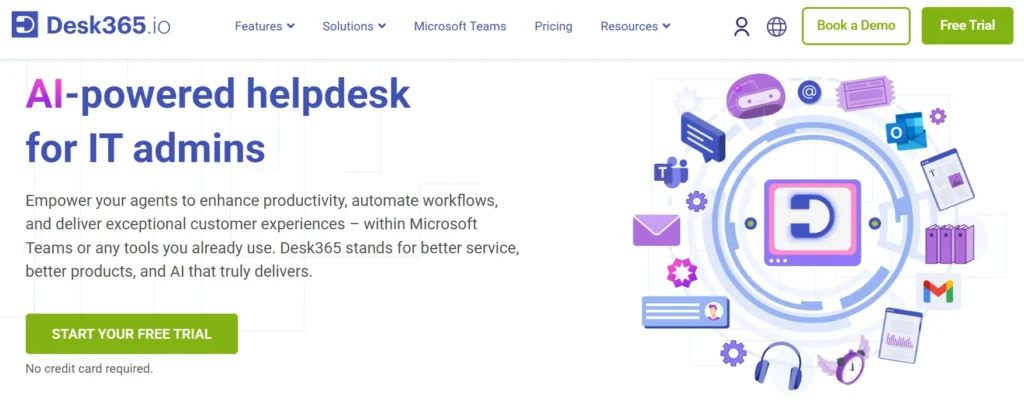
Desk365 is a cloud-based, modern help desk built for the Microsoft 365 workplace. It focuses heavily on Microsoft Teams as the primary support channel, meaning your agents can manage tickets right from Teams without switching tabs.
It’s known for being incredibly easy to set up, having a clean and intuitive interface, and offering strong automation features at a competitive price. It also has an active product team that ships new features regularly, users on review platforms rave about weekly updates.
Who is it for? Customer support teams, IT departments, and small-to-mid-size businesses that use Teams as their communication hub and want a fully functional help desk without a steep learning curve.
Quick Answer: Helpdesk 365 is the stronger pick for SharePoint-heavy enterprises that need deep Microsoft integration and advanced customization. Desk365 wins for teams who want a modern, AI-powered ticketing experience with a cleaner UI and faster setup, especially those who live in Microsoft Teams.
Feature-by-Feature Breakdown
1. Ticket Management
Both platforms cover the essentials, ticket creation, assignment, prioritization, and status tracking. But they go about it differently.
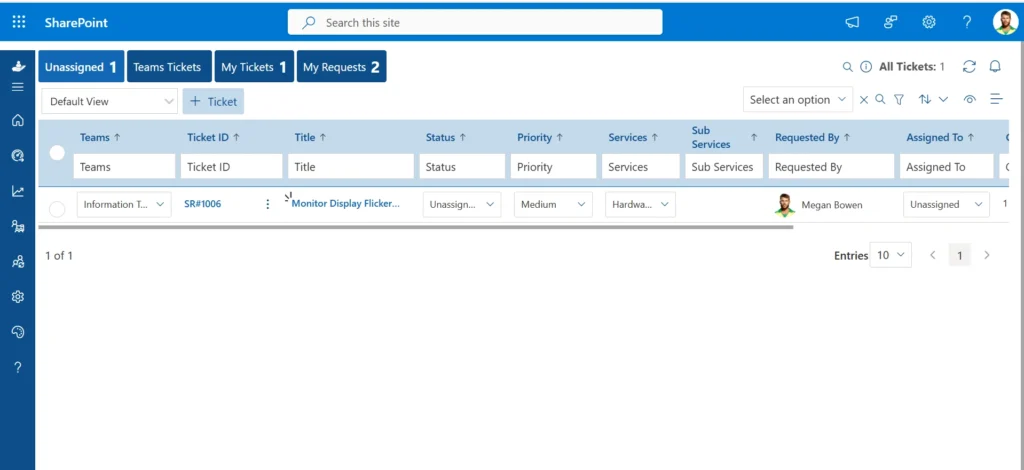
Helpdesk 365 gives you serious structural depth.
- You can split a single ticket into multiple sub-tickets when an issue touches different teams
- Merge duplicate requests into one thread so nothing gets handled twice
- Organize request types into multilevel sub-service categories — for example, IT → Hardware → Laptop Repair
- Condition-based columns let form fields appear or disappear dynamically based on what the user selects
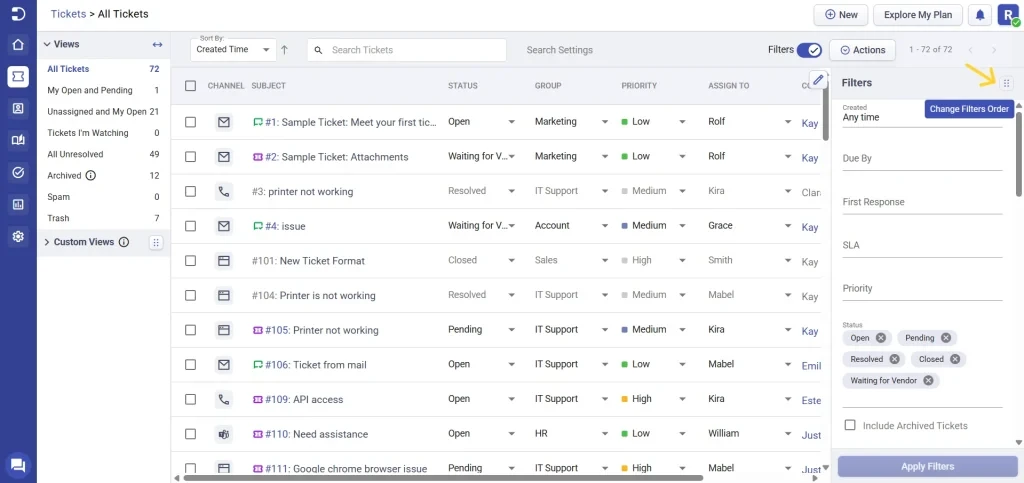
Desk365 focuses on making the agent experience fast and mistake-proof.
- Tickets feel like chat threads — natural for agents already used to messaging apps
- Agent collision detection warns two agents in real time if they both open the same ticket
- A ‘Watchers’ feature lets managers silently follow any ticket without being assigned to it
- One-click macros and templates close repetitive requests in seconds
2. Microsoft 365 Integration
This is the single biggest differentiator between the two tools, and it comes down to one question: are you more SharePoint-first or Teams-first?
Helpdesk 365 is SharePoint-native. Tickets are stored as SharePoint list items inside your own tenant. Attachments live in your SharePoint document libraries. Permissions use your existing SharePoint groups. It also connects with Outlook, Azure AD, Power Automate, Power BI, and Microsoft Copilot, all without your data ever touching an external server.
Desk365 is Teams-native. Agents receive, respond to, update, and close tickets entirely within Microsoft Teams. End users submit requests through a Teams bot without ever opening a separate portal. It also supports Azure Entra ID for single sign-on, Power Automate for custom workflows, and Microsoft 365 Copilot for AI-assisted responses.
3. AI & Automation
Unlike hardware, software does not physically degrade, but it becomes less valuable over time as new versions are released, and older versions become unsupported. Software licenses also have a set period of validity, after which they may need to be renewed or replaced. For businesses, depreciating software helps accurately reflect its value over its lifecycle, ensuring that companies don’t overstate the asset’s worth.
In addition to general software, businesses must account for the depreciation of various software licenses. These licenses may lose value as newer versions are released, or as vendors stop supporting older software versions.
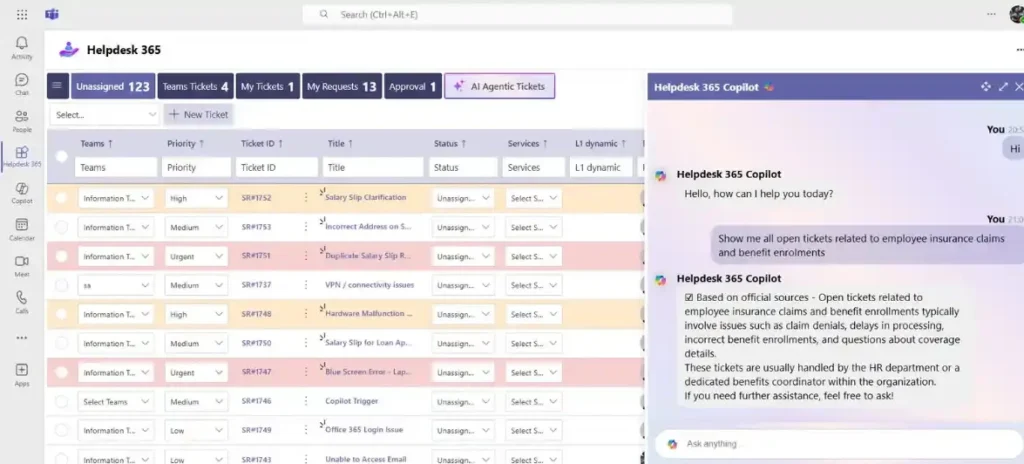
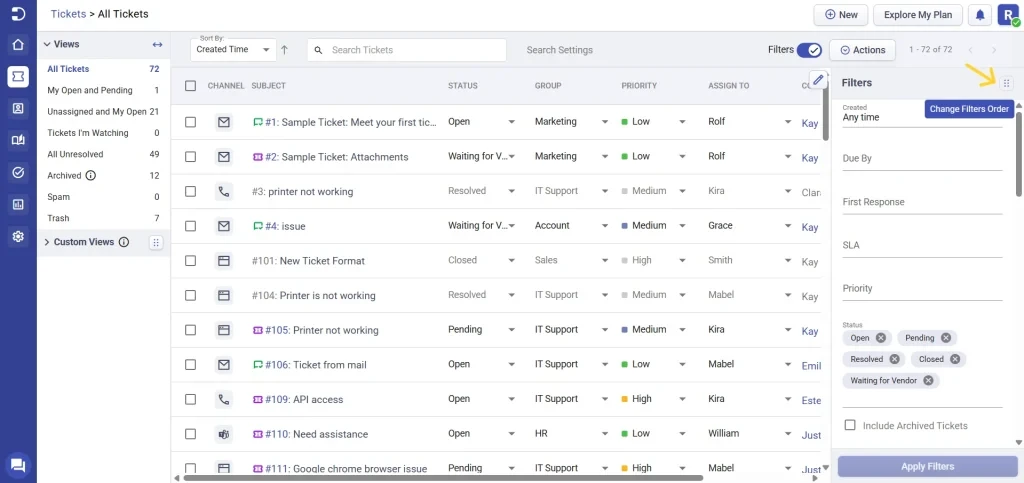
Desk365’s AI Agent is arguably more advanced as a standalone engine. It learns from your historical ticket data to auto-respond to repetitive requests, summarize long ticket threads, draft replies in 30+ languages, and even generate knowledge base articles automatically based on patterns in resolved tickets. Its round-robin assignment and keyword-based routing also work out of the box without any complex configuration.
4. Self-Service & Knowledge Base
The best ticket is the one never submitted. A good knowledge base and self-service portal reduces front-line volume so your agents spend time on issues that actually need a human.
Helpdesk 365 includes a Chatbot Bubble 365, an embedded website widget that proactively surfaces relevant help articles before a user even submits a ticket. It’s a simple but effective deflection mechanism. Agents can also link KB articles directly inside ticket responses.
Desk365 offers a branded self-service portal, a multi-folder knowledge base with agent review and publish workflows, and AI-powered article generation. Articles can be made public for customers or kept internal as agent training material. It also supports multi-brand knowledge bases, useful if you’re managing support for multiple products or departments from one account.
5. SLA Management
SLAs define the response and resolution times your team commits to. Without proper SLA tools, tickets fall through the cracks and trust erodes fast.
Helpdesk 365 supports multiple SLA policies with condition-based triggers, meaning you can apply different SLA rules based on ticket type, priority, category, or any custom field value. The SLA clock pauses automatically when a ticket is waiting on the customer, and escalation happens automatically when a breach is approaching.
Desk365 handles SLAs with a focus on multi-team and multi-region setups. You can define separate business hours, time zones, and holiday calendars for different departments or geographies, so SLA timers always reflect the actual working hours of the team responsible, not a one-size-fits-all schedule.
6. Reporting & Analytics
Data tells you where your support operation is strong and where it’s quietly failing. Both tools give you reporting, but at different levels.
Helpdesk 365 integrates natively with Power BI. If your organization already uses Power BI dashboards, your helpdesk data flows straight in, ticket volumes, SLA compliance, agent performance, trend analysis, all visualized in the same BI environment your leadership already reviews.
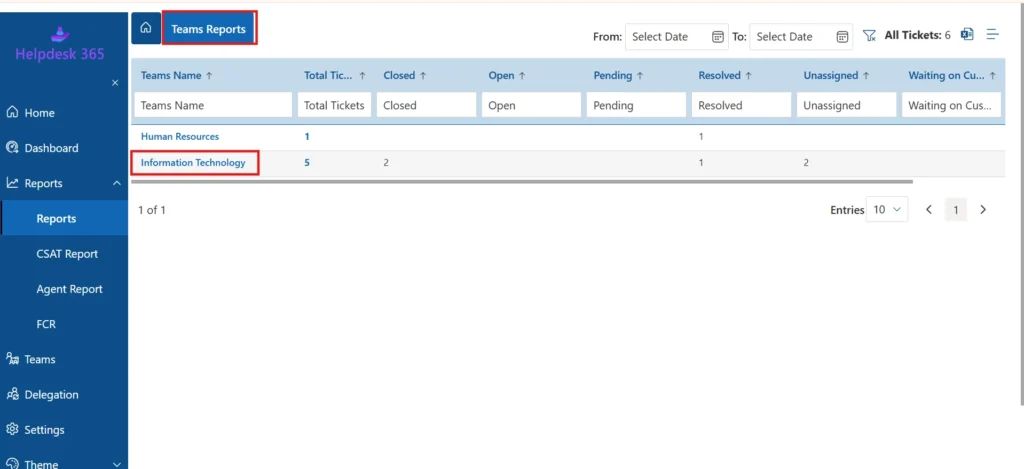
Desk365 offers built-in dashboards that are ready immediately with no extra setup. It also includes CSAT (customer satisfaction) tracking, after a ticket is closed, customers are prompted to rate their experience. That feedback feeds directly into your reporting, giving you a human signal alongside the operational metrics.
7. Security & Data Control
For enterprise buyers, this often becomes the deciding factor, especially in regulated industries like healthcare, finance, or government.
Helpdesk 365 stores all ticket data inside your own SharePoint tenant. Your data never touches an external server. Microsoft 365’s enterprise-grade security, compliance tools, and data residency controls all apply automatically. For organizations that have invested in Microsoft Purview or have strict data governance requirements, this is a significant advantage
Desk365 operates as a cloud-hosted platform with encryption in transit and at rest, Azure Entra ID SSO, and role-based access controls. Its 2026 Premium plan adds HIPAA compliance, a meaningful upgrade that makes it viable for healthcare organizations that previously couldn’t consider it.
Pros & Cons Summary
Feature / Criteria | Helpdesk 365 | Desk365 |
Pricing Model | Flat-rate pricing | Per-agent pricing |
Microsoft Ecosystem | SharePoint-native, Copilot & Power BI integration | Strong Microsoft Teams integration |
Customization | Advanced forms, workflows, and automation | Simpler configuration with fewer customization options |
Ease of Use | Rich features but higher learning curve | Easy setup and user-friendly interface |
Scalability | Well-suited for growing and enterprise teams | Best suited for small to mid-sized teams |
Customer Support | Comprehensive support options | Highly rated customer service |
Main Drawbacks | Can be complex for new users; premium features may cost more | Costs rise with additional agents; notification options are limited |
Which One Should YOU Choose? (Honest Recommendation)
Choose Helpdesk 365 If…
- Your organization is deeply rooted in SharePoint and wants data stored within your own Microsoft tenant.
- You need advanced ticket customization, splitting, merging, multi-level sub-services, custom approval workflows.
- You’re on a Microsoft 365 E3/E5 plan and want to leverage Copilot and Power BI for support intelligence.
- You have 50+ users and want to avoid per-user pricing climbing out of control.
- Your team works across IT, HR, and Operations, departments that need distinct, tailored support workflows.
Choose Desk365 If…
- Microsoft Teams is where your team lives, and you want agents to handle tickets without leaving Teams.
- You want to be up and running quickly with minimal IT overhead and configuration complexity.
- You’re a small to mid-sized business looking for a modern, polished help desk without breaking the bank.
- You value a responsive product team that ships updates fast and actually listens to user feedback.
- You’re looking for a 21-day free trial to thoroughly evaluate the product before committing.
Conclusion
Both Helpdesk 365 and Desk365 are solid choices for Microsoft 365 environments. However, Helpdesk 365 stands out with its deep SharePoint integration, Microsoft Copilot capabilities, advanced customization, powerful reporting, and enterprise-ready security
If you’re looking for a scalable help desk solution that grows with your organization and maximizes your Microsoft 365 investment, Helpdesk 365 is a strong choice to consider.
Join Our Creative Community
Frequently Asked Questions
Is Helpdesk 365 the same as Desk365?
No — they are two completely different products from different companies. Helpdesk 365 is built by Apps365 and is SharePoint-native. Desk365 is a standalone cloud-based help desk platform. The similar names cause a lot of confusion, but the products, companies, and approaches are distinct.
Which is better for Microsoft Teams, Helpdesk 365 or Desk365?
Both integrate with Microsoft Teams, but Desk365’s Teams integration is deeper and more seamless for day-to-day agent operations. Helpdesk 365 offers Teams integration primarily as a notification and access channel, while Desk365 essentially turns Teams into a full help desk interface.
Can I migrate from Desk365 to Helpdesk 365 (or vice versa)?
Both platforms offer data export options. Migration complexity depends on your ticket volume and workflow customization. We recommend trialing your target platform before committing to a full migration.
Which is more secure for enterprise use?
Both are built on the Microsoft 365 infrastructure. Helpdesk 365 has a slight edge for strict data-residency requirements since it stores tickets within your own SharePoint tenant — data never leaves your Microsoft environment. Desk365 is cloud-based and maintains strong security standards but operates outside your tenant.
Do either tools offer a free version?
Neither offers a permanent free tier, but both have free trials. Helpdesk 365 offers 14 days; Desk365 offers a generous 21-day free trial with no credit card required.


_JiluXJRGNl.svg)























