

Automated Contract Review: Improve your Legal Review Process

If your legal team is summarizing contracts word by word, you know the real challenges. It’s slow. It’s expensive. And the sheer number of contracts most companies must deal with today makes it difficult to review them manually.
That’s where automated contract review comes in and why so many legal, procurement, and operations teams are looking at it seriously right now.
- Automated contract review uses AI to analyse contracts, identify risks, flag unusual clauses, and reduce the time spent on manual reviews.
- Legal, procurement, and sales teams can review agreements faster while maintaining consistency across contract terms and compliance requirements.
- Automated review tools help detect missing clauses, unfavourable language, and deviations.
- By reducing manual effort and accelerating contract cycles, automated contract review improves and speeds up business transactions.
What Is Automated Contract Review?
Automated contract review is the process of using software to scan, analyse and highlight potential problems in contracts
According to WorldCC, 81% of companies want to automate contracts, which suggests its growing importance in the business world. Automated contract review tools are not a substitute for lawyers. The lawyer reviews the important items and makes the decisions.
Contract review automation covers a range of tasks depending on the platform, including:
- Identifying and extracting key clauses (indemnification, limitation of liability, termination rights)
- Comparing contract language against your playbook or standard templates
- Flagging non-standard terms and missing provisions
- Summarizing long documents for quick review
- Tracking obligations and key dates
- Highlighting high-risk language
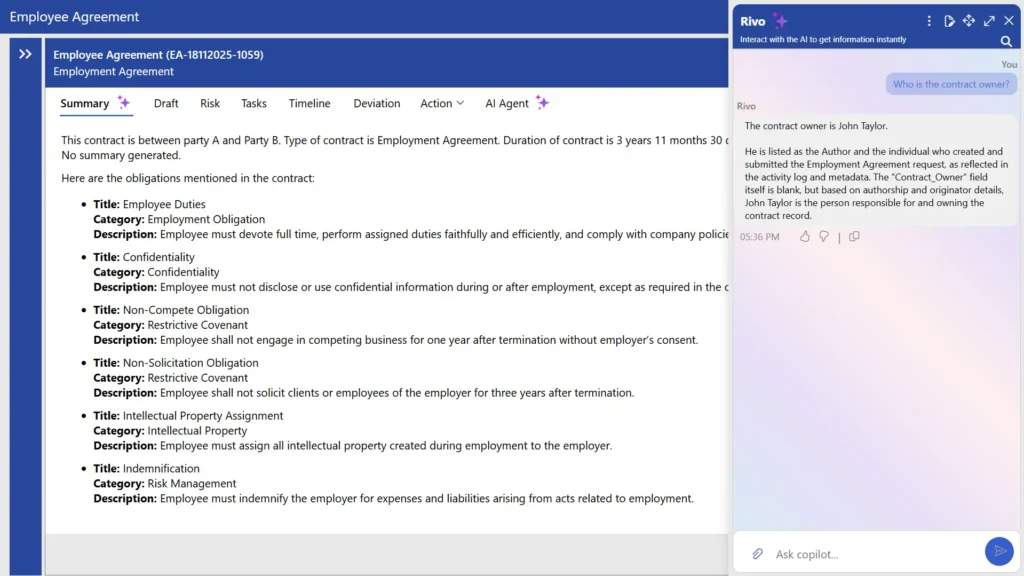
Get contract insights instantly
AI summarizes key clauses and terms, helping teams review contracts faster.
Why Legal Teams Are Moving Automated Contract Review Process?
The take-up of contract review automation has been rapid in the past two years and for good reason.
1. The Volume Problem
Mid-sized and large companies have hundreds or thousands of contracts to review each year. Vendor contracts, customer contracts, confidentiality agreements, employment contracts, partnerships. The number of contracts places stress on overburdened legal teams. According to Gartner, lawyers in corporate departments spend nearly 25%–40% of their time on activities such as drafting, approvals, or monitoring deadlines.
When a significant portion of a lawyer’s week is spent on routine document review, that’s time not spent on strategic work advising leadership, managing disputes, or supporting growth decisions.
2. Legal Leadership Is Already Investing
This isn’t a theoretical shift. According to a Gartner study, 66% of legal leaders already plan to increase their investment in legal technology. Automated contract review is a shift that is occurring now and the companies who are first to move are gaining a competitive edge.
3. AI Has Gotten Accurate Enough
The first generation of AI contract tools were not accurate enough for lawyers to trust. That’s changed. Fynk says that businesses using AI to handle contracts have improved contract review accuracy by 35% over traditional methods.
This doesn’t mean AI is perfect. But it does mean the technology has matured enough to be genuinely useful not just as a novelty, but as a core part of how contracts get reviewed.
How Contract Review Automation Actually Works?
Understanding the mechanics helps you have better conversations with vendors and set realistic expectations with your team. Most modern contract review automation systems work in three layers:
1. Contract Upload
Contracts are uploaded in a range of formats PDF, Word, or from your contract repository. It transforms the document into a format that the AI can process, maintaining section headings, clause numbers, and other formatting clues.
2. Clause Detection & Extraction
The AI, trained on millions of contracts, recognizes different types of clauses, even if they are written differently or in different languages. It will locate an indemnification clause regardless of whether it’s titled “Indemnification” or something more obscure.
3. Risk Analysis & Flagging
It matches the extracted clauses with your playbook or default risk rules. It highlights differences with suggested changes and manages contract risk or comments for the attorney. Some even provide a red-lined draft for negotiation.
4. Summary & Workflow Output
Automated contract review software provides a summary report and sends the redlined document to the appropriate reviewer. It also captures key metadata such as parties, duration, renewals, and obligations and stores it in your contract management system.
Features of Automated Contract Review
It uses AI and automation to simplify how contracts are analysed, understood, and managed. Here are some features to consider.
1. AI-Powered Clause Detection
Contract automation can detect important clauses like termination, payment, liability, renewal and confidentiality. Rather than reading the entire document, the system automatically identifies these sections. This helps teams priorities the key sections and review contracts in a more structured and standardized manner.
2. Smart Contract Summarization
It can turn long and complex contracts into brief summaries. These summaries include the key elements, such as terms, obligations and deadlines. The AI contract summary enables legal and non-legal teams to grasp the contract in a timely manner without having to read the entire document.
3. Risk and Obligation Highlighting
It highlights key risks and obligations in the contract. This includes payment obligations, penalties and party obligations. This makes it easier for teams to understand their obligations and ensures that no key details are missed in the review.
4. Clause Comparison and Standardization
With automated contract review, teams can analyse and compare contract clause. This can help detect similar or duplicate clauses and ensure they are written in the preferred or standard language. This ensures consistency between contracts and helps maintain consistent contract terms within the company.
5. Automated Data Extraction
The software extracts important data such as contract dates, parties involved, payment terms, renewal timelines, and key clauses. This information is organized into a structured format, making it easy to track, search, and use for reporting or analysis without manual work.
6. Workflow and Approval Automation
It establishes a structured process by automatically routing contracts to the appropriate parties. The review and contract approval process is mapped out, so you can see who has reviewed the contract. This keeps the process moving smoothly and ensures that approvals are completed in a timely and organized manner.
7. Searchable Contract Insights
Contract review automation makes contract information searchable. Users can search for specific clauses, dates, parties or terms using filters. This allows them to quickly find the information they need without wading through documents. It also enables teams to search for contract data, find trends and retrieve information at their convenience.
What Automated Contract Review Actually Covers?
It will vary by system, but here are some of the key areas covered by more sophisticated systems.
1. Key Commercial Terms
Pricing, payment, scope of services, delivery schedules – automated tools extract these and can compare them to your standard terms or previous contracts to identify departures that can cause issues later.
2. Risk Clauses
Most important provisions in commercial contracts are indemnification, limitation of liability, intellectual property ownership, privacy obligations and audit rights. It identifies these with more than “found” or “not found”, but how the language compares to your standard and where exposure exists.
3. Obligations & Deadlines
The cost of missing a contract deadline or renewal notice can be far greater than the cost of an automation system. Automated contract review helps track important dates, contractual obligations, and notice periods by automatically adding them to your calendar.
4. Missing Provisions
Perhaps the most valuable aspect of automated contract review is what it leaves out. If a contract lacks a dispute resolution provision, a data security clause, or a regulatory provision, it’s identified before the contract is signed, not after a dispute.
Difference Between Manual and Automated Contract Review
Understanding the differences between these approaches can help organizations choose the right method based on their contract volume, review speed, and risk management needs.
Aspect | Manual Contract Review | Automated Contract Review |
Time Taken | Reviewing a 30-page contract can take 2–4 hours or more. | The software scans the contract in minutes and highlights important sections. |
Contracts Reviewed Per Day | A reviewer may handle 3–8 contracts per day depending on complexity. | Software can review 100+ contracts per day without delays. |
Finding Risks | Important clauses can be missed when reviewers are busy or tired. | Automatically flags risky terms, missing clauses, and unusual language every time. |
Consistency | Two reviewers may identify different issues in the same contract. | Every contract is checked using the same rules and standards. |
Cost | Reviewing 1,000 contracts often requires more time and resources as contract volume grows. | Helps teams manage larger contract volumes efficiently without increasing review effort. |
Bringing Speed, Accuracy, and Security to Every Contract with AI
From legal teams to business users, everyone can benefit from clear summaries of complex clauses and key contract terms.
Benefits of Implementing Automated Contract Review System
The case for contract review automation isn’t abstract. Here’s what it looks like in practice across different team types.
1. For In-House Legal Teams
Smaller in-house teams often one to five lawyers supporting a whole company feel the contract volume problem most acutely. Automated contract review gives these teams capacity without headcount. A two-person legal team can handle what used to require four, freeing up time for strategic legal support.
2. For Procurement & Operations Teams
Not every contract goes through legal. Procurement teams often review vendor contracts, MSAs, and SOWs without dedicated legal support. Contract review automation gives non-lawyers a structured way to check contracts against approved standards and escalate only the real exceptions instead of sending everything to legal.
3. For Law Firms & Legal Service Providers
Due diligence on M&A deals or real estate portfolios can involve reviewing hundreds or thousands of contracts in a short window. It makes that feasible without building large temporary review teams. According to Thomson Reuters, 53% of organizations are already seeing at least one measurable benefit from AI adoption in their legal workflows.
4. For General Counsel
GCs using contract review automation get reporting and visibility they didn’t have before: what types of contracts are being signed, where deviations from standard terms are most common, which counterparties push hardest on liability caps. That data informs how you negotiate and manage risk at scale.
Data Security in AI Contract Analysis
Contracts often contain confidential business information, financial details, and sensitive agreements. As organizations adopt AI-powered contract analysis, protecting this information remains a top priority.
CLM 365 helps organizations analyze contracts while keeping data within their existing Microsoft 365 environment. Contract information stays within your organization’s Microsoft tenant, providing greater control over how data is stored, accessed, and managed.
Because CLM 365 works within your Microsoft ecosystem, teams can continue using their existing permissions, security settings, compliance policies, and governance controls. This helps organizations maintain visibility over contract data while benefiting from AI-powered insights.
Whether you’re reviewing clauses, identifying obligations, summarizing agreements, or analysing contract terms, CLM 365 helps teams work more efficiently without moving contract data outside their trusted Microsoft environment.
For organizations with regulatory, compliance, or internal governance requirements, this approach supports secure contract analysis while maintaining control over sensitive information.
Get smarter contract insights without compromising security
Best Practices to Implement During the Process
Getting contract review automation deployed is not just a technology project it’s a change management project. Here’s how to do it well.
1. Audit your current contract process
Map out how contracts currently move through your organization from request to signature. Identify the biggest time sinks, the most common contract types, and the highest-risk areas. This becomes your implementation priority list.
2. Digitize and standardize your playbook
It only works as well as the standards you feed it. Before you go live, make sure your acceptable positions, fallbacks, and deal-breakers are clearly documented and agreed on internally.
3.Start with one contract type
Don’t try to automate everything at once. Pick the highest-volume or most repetitive contract type NDAs are often the best starting point and get the tool working well there before expanding scope.
4. Expand and refine over time
Once your team is comfortable with the first use case, expand to other contract types. Continuously refine the playbook based on what the tool flags versus what lawyers override those overrides are valuable training signals.
Common Mistakes to Avoid with Contract Review Automation
Implementations that fall short often do so for common and avoidable reasons. Here are a few key areas to be mindful of.
1. Lack of Continuous Maintenance and Updates
It requires regular updates to stay aligned with evolving contract language and regulatory changes. Maintaining rules and playbooks up to date ensures the system continues to deliver accurate and relevant outputs. This also helps maintain consistency across all contract review process over time.
2. Limited Legal Team Involvement
Active involvement from legal teams supports better adoption and effectiveness. When attorneys participate in testing, feedback, and configuration, the system aligns more closely with real-world requirements and workflows. It also builds confidence in using the tool across the organization.
3. Application to Highly Complex Contracts
The automated contract review software performs best with contracts that follow structured and repeatable formats. For highly complex or heavily negotiated agreements, a more tailored review approach alongside automation can deliver better results. This ensures accuracy while still benefiting from automation where applicable.
4. Underutilization of Generated Data Insights
It automatically generates valuable data over time, including patterns in contract cycles, clause usage, and negotiation trends. Leveraging these insights can help improve drafting, negotiation strategies, and overall contract management. It also supports more informed decision-making across teams.
5. Lack of Clear Review Guidelines
It works best when there are clear rules and standards in place. Without defined guidelines, the system may not capture or highlight the right information. Setting clear expectations for clauses, terms, and review criteria helps ensure more accurate and consistent results.
How CLM 365 helps review contracts?
CLM 365 is developed within the Microsoft ecosystem, enabling seamless connectivity with SharePoint, MS Teams, Microsoft Outlook, Microsoft Copilot, Power BI, and Power Automate. This allows teams to handle contracts directly within the tools they already use, keeping processes smooth and connected.
Designed with enterprise-grade security and a simple, user-friendly interface, it supports both growing businesses and large enterprises in managing contracts with confidence.
CLM 365 is backed by SOC 2 compliance, Microsoft certification, and Microsoft Solutions Partner, ensuring a secure and reliable contract management environment.
With built-in AI capabilities, it simplifies contract management by helping teams review, organize, and extract key information efficiently. AI agents allow users to simply enter prompts and receive quick, clear insights, making contract handling faster and easier
Ask, Understand, Analyze and Act
Ask a question, and CLM 365’s Agentic AI delivers the contract insights you need in minutes.
Conclusion
Automated contract review brings speed, clarity, and consistency to how contracts are handled. It helps teams quickly understand key terms, identify important clauses, and manage large volumes of contracts with ease. By combining AI with structured workflows, organizations can simplify reviews, improve accuracy, and make faster decisions without getting lost in complex documents.
Ready to simplify your contract review process? Start your 14-day free trial with CLM 365 and experience a smarter, faster way to manage contracts.
Frequently Asked Questions
Is automated contract review secure for sensitive agreements?
Reputable platforms offer enterprise-grade security: encryption at rest and in transit, SOC 2 Type II compliance, and data handling agreements. Always review a vendor’s security documentation before uploading sensitive contracts and check whether their model is trained on customer data.
Does contract review automation work for small legal teams?
Yes, and it often delivers the most value for smaller teams. A one- or two-person in-house legal team that handles a high volume of routine contracts gets a significant capacity boost from automated contract review without the cost of additional headcount.
What's the difference between automated contract review and a full CLM platform?
Automated contract review tools focus specifically on reading and analysing contract content. CLM platforms cover the full contract process from request through signature and renewal.
Does CLM 365 support comparing two contracts within the platform?
Yes, CLM 365 supports comparing two contracts or multiple contract versions directly within the platform. Users can view contracts side-by-side, track edits, identify revisions, and review changes quickly using AI-powered document comparison features.
Can automated contract review reduce contract turnaround time?
Yes, businesses often reduce review and approval time significantly with AI automation.
Table of Contents

Trusted by the Best

_JiluXJRGNl.svg)























