



















Smarter Asset Management by Asset Management Plus
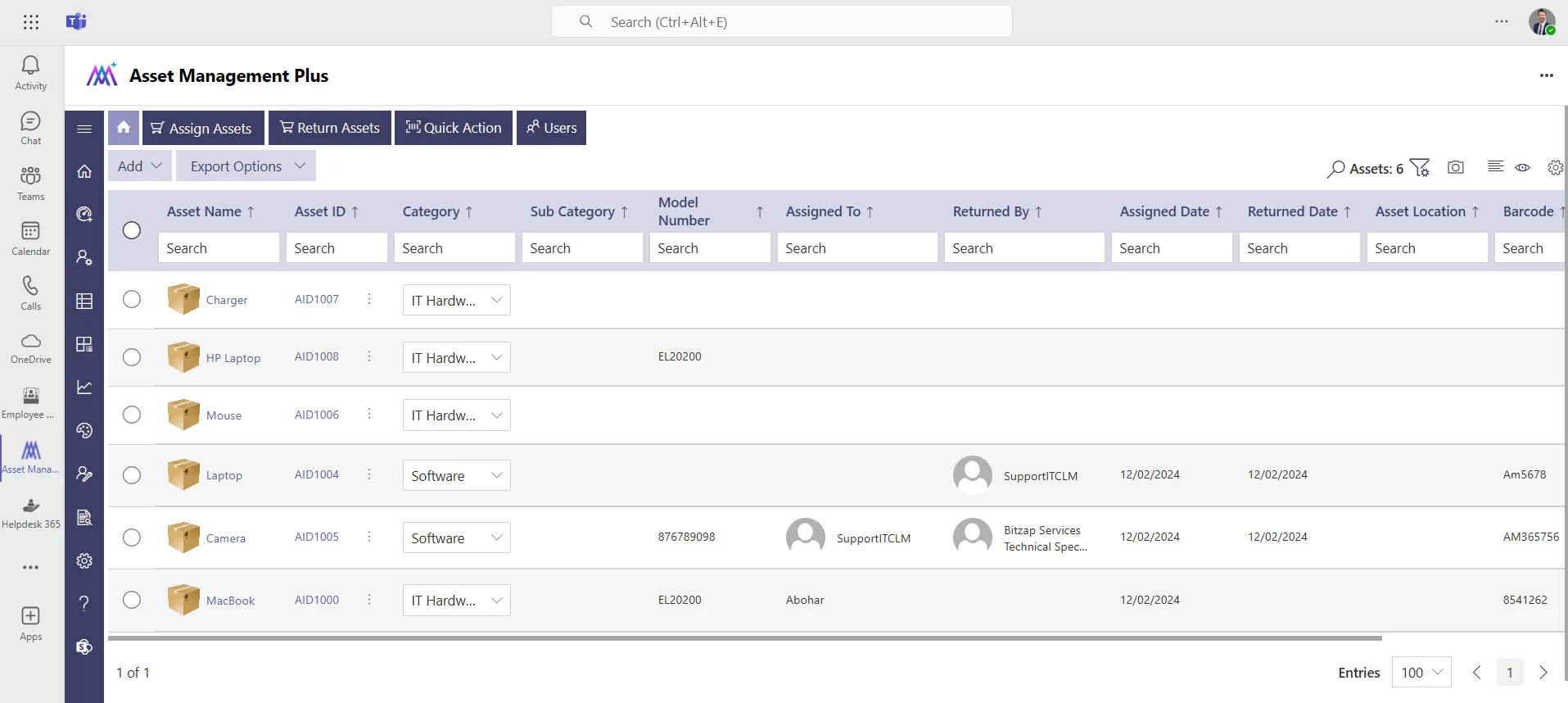
With Asset Management Plus, managing your assets becomes effortless. Seamlessly integrated with Microsoft 365, it saves time, enhances workflows, and boosts efficiency.
Trusted by 11700+ businesses from 167 countries


Simplified Asset Management with AI Integration
Track and manage your assets effortlessly with Asset Management Plus, our AI-powered SharePoint solution. With automated workflows and intelligent features, asset management is streamlined, allowing you to focus on growing your business.
Why Asset Management Plus?
Asset Management Plus offers a comprehensive, secure, and intelligent approach to asset tracking. Simplify your operations and boost productivity with a single solution.
Cyber Security
Asset Management Plus works within the Microsoft 365 environment to help organizations manage asset information securely. Support for GCC and GCC High environments also helps eligible US government organizations meet their Microsoft cloud requirements.
GCC & GCC High
Our apps are built for GCC & GCC high tenants of US Federal clouds.
SOC2 Type II Certified
Our apps ensure security, compliance, and data protection
MS Azure Marketplace
Our apps are tested by Microsoft and available on MS Azure Marketplace
Microsoft Appstore
Our innovative applications are available on the Microsoft Appstore.
Customer Support
Your Support Team merges technical prowess with sincere care, fostering trust through expertise and empathy. They build lasting relationships, transcending mere service to create meaningful connections.
AI Enabled Apps
Our innovative apps are built with the options of Azure AI, Copilot, and custom AI solutions.
Swift Deployment
Choose any deployment method—Teams, Outlook, or SharePoint—that suits your preferences.
Modern UI/UX
Every app is crafted using the latest Fluent UI, ensuring seamless functionality across all devices.
Free Updates
Our valued subscribers enjoy unlimited support, enhancements, features, and updates.
Effortless Intune
Sync -Seamlessly sync asset data with Microsoft Intune, ensuring real-time updates, accurate device management, and enhanced security compliance.

Microsoft 365 Certified
Built for the Microsoft 365 environment. Manage asset information securely while supporting easier user management and compliance.
Asset Lifecycle Management
Manage assets from purchase through retirement. Track each stage to improve asset use, reduce downtime, and control costs.

Print Asset QR & Barcode
Quickly generate and print QR codes and barcodes for assets, enabling fast identification, easy tracking, and efficient inventory management.
Microsoft Intune Integration
Sync asset and device data with Microsoft Intune. Keep records updated while improving device tracking and security compliance.

Multiple Assign and Return
Easily assign and return multiple assets at once, simplifying asset management and ensuring accurate tracking of asset ownership and availability.

Inventory Management
Track your asset inventory in real time. See stock levels, asset locations, and availability from one place.
Custom Email Template
Create and personalize email templates to streamline communication, ensuring consistent and professional messaging for asset assignments, returns, and notifications.
Custom Fields
Add fields based on the information your organization needs. Keep asset records relevant to your internal processes.
Bulk Asset Management
Update multiple asset records at once. Save administrative time when managing large asset inventories
Inventory Reports
Create reports for asset inventory, ownership, and usage. Give teams clear information for planning and audits.

Dashboard & Themes
Customize dashboards to view asset data, inventory status, and important updates at a glance.

Responsive and Multi-Lingual
Access the platform seamlessly across devices with a responsive design and support global teams with multi-language options for a better user experience.
Multiple Geographic Locations
Track assets across multiple offices and locations. Know where each asset is assigned and maintain accurate location records.
Asset Maintenance
Plan and track asset maintenance from one place. Keep service records organized and reduce unexpected equipment downtime.
Audit Logs
Keep a clear record of asset activities and changes. See who made each update and when it happened.
Work Smarter with IT Asset Management Software
Let smart solutions handle the heavy lifting, freeing your team to focus on what truly matters—efficient asset management. Software Asset Management 365 helps you automate, organize, and streamline asset tracking effortlessly. Whether your business is small or large, it empowers you to work smarter, optimize resource utilization, and enhance productivity without the hassle.
Responsive - Any Device Access
Access and manage asset data effortlessly from desktops, tablets, or smartphones, anytime and anywhere.
Customizable Fields and Templates
Add custom fields to capture specific asset details and use ready-made templates to simplify managing different asset categories.
Clear and Easy Knowledge Base
Store troubleshooting guides, maintenance tips, & FAQs to help teams find quick solutions without needing additional support.
Maintenance Scheduling
Easily set and track maintenance schedules for assets to reduce downtime and ensure they remain in optimal condition.
Multi-Language Support
Manage assets easily across global teams with seamless support for multiple languages, time zones, and regional settings.
Predictive Maintenance Insights
Get proactive maintenance alerts powered by AI, reducing unplanned downtime and extending asset life.
Usage Trend Analysis
AI tracks and analyses asset usage patterns, providing actionable insights to optimize resource allocation and improve efficiency.
Automated Asset Assignment
Accelerate operations by using AI to assign assets based on location and team requirements, enhancing efficiency and workflow.
Get Real-Time Notifications
AI-powered alerts let you respond quickly to maintenance delays, asset inventory management shortages, and performance problems.
Asset Categorization
Use AI to organize and categorize assets into relevant groups, ensuring efficient tracking and seamless management.
Visual Recognition with Thumbnails
Create thumbnails for assets using AI to enhance visual identification, making it easier to track and manage assets efficiently.
Key Features of Asset Management Plus
Manage and track every asset from one place. Keep asset records accurate, organized and easy for your team to manage.
Benefits of Asset Management Software
Increased Efficiency
Simplify asset management to save time and reduce effort. Automate routine tasks and organize resources, so your team can focus on more priority tasks.
Cost Optimization
Track asset usage and performance to identify underutilized resources, eliminate redundancies, and make data-driven decisions that reduce costs and maximize ROI.
Improved Asset Visibility
Gain full visibility of all your assets, keeping everything organized and accounted for. This clarity allows for better planning and resource allocation.
Boost Efficiency
Save time with automated asset tracking and optimized maintenance schedules.
Reduce Costs
Simplify procurement processes and maximize resource utilization.
Track Assets & Inventory
Easily track both retainable and non-retainable assets, ensuring accurate inventory management and optimal resource utilization.
Enhance Visibility and Control
Gain detailed insights into asset usage, enabling streamlined compliance and fully automated audit procedures.
Discover Innovation
Leverage advanced technology and dedicated customer support for seamless asset management and exceptional user satisfaction.
Boost Productivity with Seamless Integrations
Easily set up, customize, and manage Asset Management Plus with powerful tools to simplify employee management and enhance organizational connectivity.
Power Automate
Save time by automating asset updates, notifications, and approval processes for streamlined asset management workflows.
Power BI
Generate clear reports to track asset performance, usage, and costs, enabling smarter business decisions.
Power Apps
Leverage AI chatbots to instantly answer common questions about asset availability, locations, or maintenance schedules.
Power Virtual Agent
Create custom apps to improve asset management and integrate seamlessly with Asset Management Plus 365.
These integrations ensure that your team can connect seamlessly, collaborate effortlessly, and enhance workplace productivity like never before.
Asset Management Plus Plan
$14999
per month, billed yearly
Everything in Standard, and…
- Unlimited Users *
- Unlimited support
- Assets Dashboard
- Configure asset attributes
- Custom Asset status
- Custom Asset types
- Asset assign notifications
- Asset return notifications
- Bar & QR code generator
- Multiple geographic locations
- Inventory Management
- Interactive Dashboard
- Maintenance Module
- Reports
- Audit Logs
- Auto-generated QR/Barcode
- Theme Customization
- Custom Email Templates
- Multi-Lingual
Using Azure? now you can buy on Azure Marketplace or using your enterprise agreement
Customer Testimonials
Hear from satisfied customers that have transformed their team connectivity with Asset Management 365.
SharePoint Consultant, Raymond West
California
Finance Manager, Exeevo
New York
Sharepoint Developer, Recor Medical
Washington, US
Business Manager, Cerilon
Canada
Director of IT, JConnelly
New York
System Admin
Oregon, US
IT Manager, Pallas LLP
England, UK
IT Officer, HanmiGlobal Saudi
Saudi Arabia
ICT Manager, SMT Shipping
Europe
Barton Associates
Cofounder
Vice President of Operations
Head Of Information & Technology
Director of Infrastructure
Solutions Engineer
US
Director of Marketing
Chicago, US
Cloud Consultant
Netherland
Global Head, IT & Information Security
California
Educator, Department of Education
New York
IT Lead
Aberdeen, Scotland
System Administrator
San Antonio, Texas
HR Ops & Admin Manager
Boston
Partner & President
Puerto Rico
Program Manager
Adelaide, Australia
Learning & Development Manager
Florida, USA
IT Manager
Indiana
Digital Solutions Analyst
Montréal, Canada
Asset Manager
North Carolina
Administration
Dubai
IT Support Specialist
Virginia, USA
Supervisor
Mexico
IT Admin
United States
Schedule a Free Trail
Discover the full potential of our product with a complimentary trial today!
Frequently Asked Questions
Does SharePoint Have Asset Management?
Yes! Asset Management Plus is a powerful solution designed to effortlessly track and manage your assets. Built on Microsoft 365 and SharePoint, it combines ease of use with cutting-edge innovation. As a Microsoft-certified, cloud-powered platform infused with AI, Asset Management Plus helps you stay in control of your valuable assets with confidence and efficiency.
How to Create an Asset Library in SharePoint?
Setting up an Asset Library in SharePoint is quick and easy:
Click + New and select App.
In the classic experience, navigate to Lists, Libraries, and Other Apps, then choose Add an App.
Note: You must have the necessary permission to create lists. If you don’t, the + New menu or Add an App option may not be visible.
How to Create an Asset Library in SharePoint? Where Is Site Assets in SharePoint?
To locate Site Assets in SharePoint: Navigate to your site and click the settings (gear) icon. Select Site Contents from the dropdown menu. Look for Site Assets in the list. Note: If you don’t see it, you may need additional permissions or assistance from your SharePoint administrator.
How does the licensing work in Asset Management software?
What Are the Common Deployment Options for Asset Management Software?
Asset management software can be deployed in three main ways: on-premises, cloud-based, or hybrid—each catering to different business needs.
· On-Premises – Offers complete data control and security but requires local infrastructure and ongoing maintenance.
· Cloud-Based – Provides scalability, remote accessibility, and lower upfront costs, with the added benefit of automatic updates.
· Hybrid – Combines the security of on-premises storage with the flexibility of cloud solutions, offering a balanced approach.
The ideal deployment depends on factors like data sensitivity, regulatory compliance, IT infrastructure, and the organization’s preference for control versus flexibility.
How Does SharePoint IT Asset Management Software Handle Depreciation Calculations?
SharePoint IT asset management software automates depreciation calculations using various methods, including straight-line, double-declining balance, and custom configurations.
· Straight-line depreciation evenly distributes asset costs over its useful life.
· Double-declining balance applies higher depreciation in the early years.
· Custom configurations allow flexibility to meet specific business or regulatory needs
By automating these calculations, the software reduces errors, saves time, and ensures accurate financial reporting and compliance. This feature is crucial for businesses aiming for precise asset tracking and efficient financial planning.