

Employee Onboarding 365 + Copilot AI + Copilot for Modern Onboarding Experiences
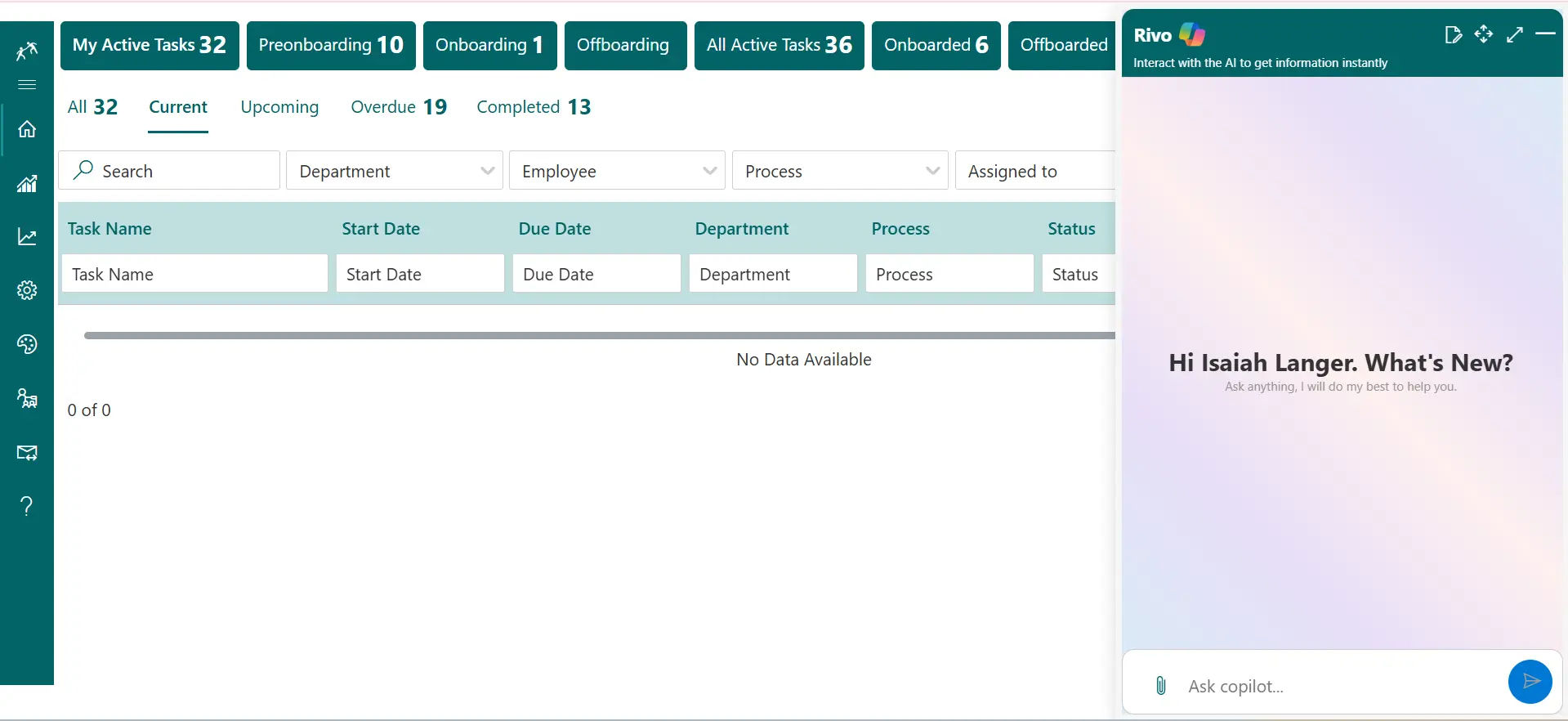
Employee Onboarding 365 with Copilot Integration makes HR tasks effortless. Quickly draft messages, summarize onboarding steps and locate documents in real time to keep the onboarding process smooth and organized.
Smarter Onboarding with Copilot
In Employee Onboarding 365 with Copilot, it is easy to control the work of new hires. Keep up with the progress immediately, propose the next steps, and open documents without leaving Microsoft 365.
Copilot allows HR and managers to prioritize people over paperwork and transforms the routine onboarding process into a quick win and provides a faster and more personalized experience to each employee.
Work Smarter with Copilot in Employee Onboarding 365
Copilot in Employee Onboarding 365 makes all the processes easier by condensing all the inputs, recommending actions, and emphasizing the essential information to make the new-hire experience smoother.
%20(1).webp)
AI-Generated Onboarding Content
Copilot writes refined welcome emails, role briefs, reminders, and training messages- assisting HR in providing clear and consistent communication each time.

Auto-Built Checklists
Create custom onboarding checklists per role, department or location in real time, saving on setup time and maintaining each journey organized.

Smart Document Access
Policies, forms, and onboarding documents are readily accessed and printed by Copilot when required by HR or new employees, eliminating the inconvenience of having to search through tools.

Real-Time Progress
See real-time onboarding status, delays, and tasks to be completed to allow the HR to act swiftly and ensure that all new employees remain on schedule.

Automated Task Updates
Since it is not necessary to update statuses manually, create daily summaries, Copilot does all the routine administration work and saves time and maintains workflows in order.

Smart Onboarding Suggestions
Copilot proposes next steps, documents to be missed, and tasks to be done depending on the role or region, to enable the HR to provide a full and compliant onboarding experience.

Internal Onboarding Support with Copilot
HR and managers receive the additional support they require to facilitate new employees with Copilot in Employee Onboarding 365. Copilot assists with writing onboarding messages, summarizing progress, and pointing out what to do next in your Microsoft 365 workspace.
It keeps all people on track by immediately bringing up the correct documents, previous onboarding history, and essential requirements. The outcome is that there is better communication, less time is wasted on tasks, and that the onboarding process becomes more connected to all new employees.
From quick summaries to meaningful support, Copilot strengthens onboarding
Copilot provides real-time insights, prepares messages, and highlights important information within employee onboarding software to help teams maintain a more connected onboarding process.
Frequently Asked Questions
Copilot assists the HR with onboarding activities by summarizing updates, writing messages, and planning the most important steps. It makes sure that new employees receive the appropriate information in a short time. HR teams become more efficient in their workflows of onboarding with copilot Microsoft.
Yes, Copilot will write welcome messages, reminders, and follow-ups based on the stage of the onboarding process. It minimizes handwriting and maintains uniformity in communication. This will make any message more understandable and individual to new employees.
Copilot finds the appropriate documents, exposes them immediately, and offers fast briefs to HR and managers. It assists in making sure that nothing is overlooked during the onboarding cycle. Document handling is made quicker and easier with the help of Microsoft copilot, which is an AI.
Yes, Copilot simplifies complex task lists and makes them readable and visible in summaries and points out what should be addressed. It provides a clear picture of the progress at any given time to HR and managers. This causes easier coordination and more assured onboarding processes to all new employees.
Copilot integration with Employee Onboarding 365 lets your HR team use Copilot within SharePoint to get help with onboarding tasks, content, and guidance.
Copilot integration provides contextual suggestions and answers inside SharePoint so HR users can complete onboarding steps with clear guidance and fewer errors.
Yes, Copilot integration can help create or edit onboarding templates and documents based on user instructions, making paperwork easier to manage.
Yes, Copilot integration works within Microsoft 365 and SharePoint when using Employee Onboarding 365, ensuring users have a seamless HR experience.
Copilot integration requires configuration in SharePoint and licensing for Copilot, but once set up it works directly with onboarding content and tasks.
With Copilot integration, new hires can receive clearer instructions, answers, and task support within onboarding portals, helping them get started faster.
























