
Contract Management Software for Government Contractors & Public Sectors
Government departments deal with many types of contracts, including supplier deals and large construction projects. Handling these agreements properly is important to ensure transparency, follow rules, and keep work running smoothly.

What Is Contract Management for Government?
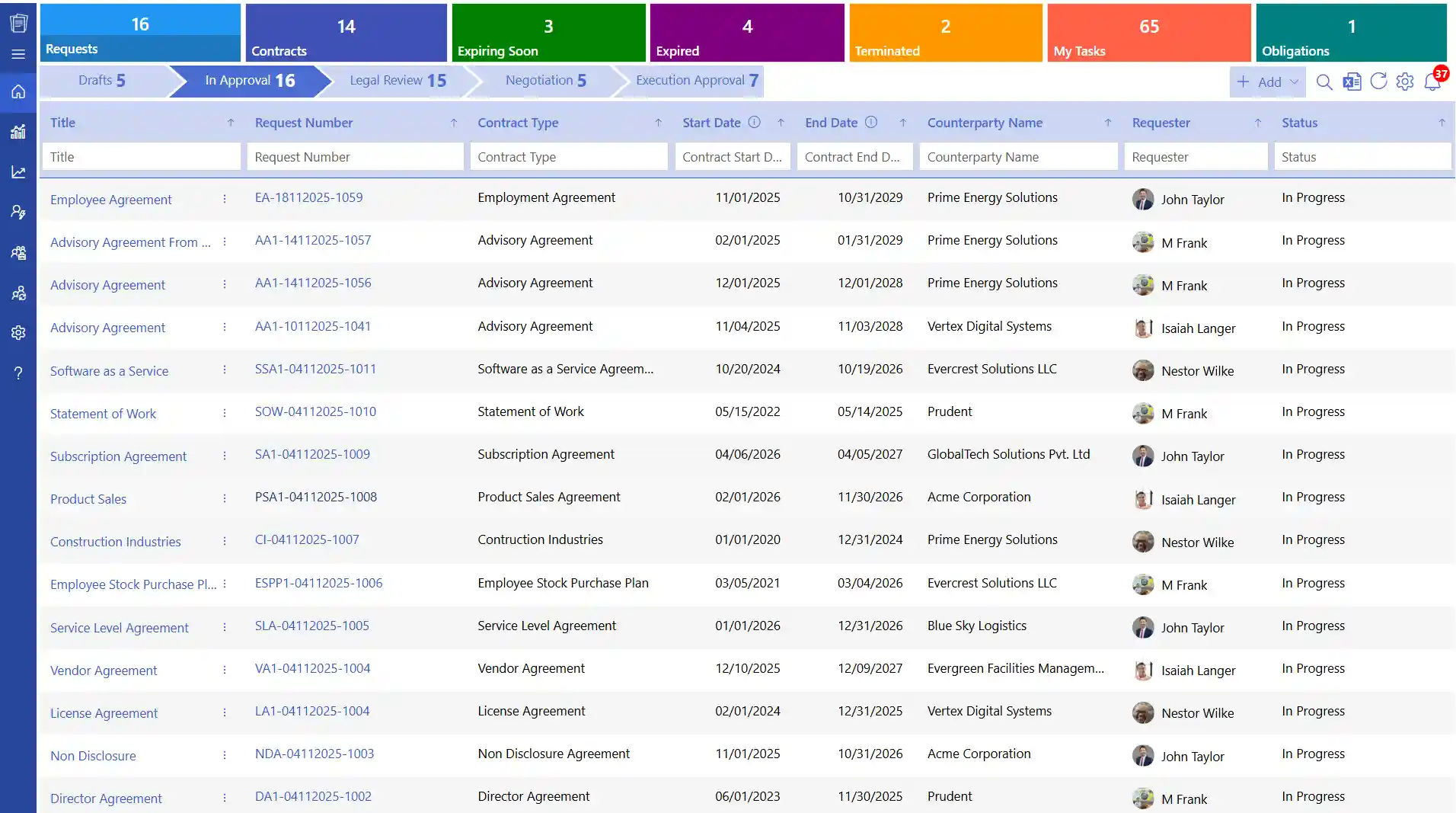
A best contract management for government is the process by which councils, agencies, and departments create, review, track, and close contracts with vendors, service providers, and employees.
Unlike private sector agreements, government contracts involve public funds, which makes transparency and accountability essential. Every stage from drafting and approvals to execution and renewal must be properly documented and ready for review by auditors or oversight bodies.
This is where contract management software for government agencies becomes critical, helping teams maintain clear records, enforce compliance, and streamline approvals without losing visibility.
Types of Government Contracts
Understanding the types of contracts your agency uses is the first step in managing them well.
Contract Type | How Payment Works | Best Used When |
Fixed-Price | A set amount agreed in advance | Scope and costs are clearly defined |
Cost-Reimbursement | Approved costs are repaid plus a fee | Projects are complex or unpredictable |
Time & Materials (T&M) | Based on hours worked and materials used | Scope is not yet fully defined |
Incentive-Based | Includes rewards for hitting targets | Encouraging better performance |
Labor-Hour | Based only on labor time at fixed rates | Service-focused work with no materials |
Each contract type carries a different level of financial risk and requires different tracking methods.
How Government Contract Management Works: Stage by Stage?
Contract management for government follows a structured lifecycle. Here is what each stage involves.
- Request and Planning
A department identifies a need and documents the requirement. This includes the expected outcome, budget, and timeline. Solid planning at this stage helps avoid delays and cost overruns later. - Contract Drafting
The contract is drafted with clear terms covering the scope of work, pricing, deliverables, and the responsibilities of each party. For government agencies, clear documentation is not optional it is a legal requirement. - Negotiation and Approval
Both parties review the draft and agree on final terms. The contract then goes through internal approval stages involving legal, finance, and department heads before it is signed. - Signing and Execution
Once approved, the contract is signed by all parties. Work begins according to the agreed terms, and responsibilities are formally assigned. - Monitoring and Performance Tracking
Teams track progress against agreed milestones and check whether the work meets required standards. Regular reports help identify issues before they become bigger problems. - Changes and Payments
When the scope, timeline, or requirements change, these updates go through a formal process. Payments are released based on agreed milestones or schedules. - Review and Renewal
At the end of the contract period, contract performance is evaluated. Based on the outcome, the contract is renewed, extended, or closed. All records are stored for audits and future reference.
How Is Government Contract Management Different from the Private Sector?
Government agencies face requirements that go well beyond what most private businesses deal with. Here is a clear breakdown.
1. Higher Legal Accountability
Government contract management are subject to review by auditors, courts, and public oversight bodies at any time. Every decision who approved it, when, and why must be documented. Accountability at this level is far stricter than in most commercial settings.
2. Close Tracking of Public Spending
Every contract involves taxpayer money. Agencies must clearly record approved budgets, payment schedules, and which department or project the funding supports. Spending cannot be ambiguous.
3. Long-Term and Complex Agreements
Many government contracts run for several years, especially in areas like infrastructure, defence, and IT. These agreements often go through multiple changes over time. Every version and modification must be stored and traceable.
4. Multiple Teams Involved
Legal teams check contract terms. Finance teams review budgets. Project teams handle delivery. Department heads give approvals. All these people need access to the same contract without stepping on each other’s work.
5. Full Record of Every Step
From first draft to final closure, every action taken on a government contract must be recorded. This level of documentation supports audits, legal reviews, and public transparency requirements.
Why Government Agencies Need Dedicated Contract Management Software?
According to a study by EY, 90% of contracting professionals find it difficult to locate contracts quickly. When contracts are spread across different systems, tracking deadlines, renewals, and changes becomes time-consuming and costly.
Here is why government contract management for software helps agencies work more effectively.
1. Improved Transparency and Accountability
All contract data, including value, deadlines, performance history, and renewal timelines is stored in a single, easily accessible system. Contract management for government helps teams stay aligned and reduces the risk of missing critical obligations. It simplifies audit preparation, ensures compliance with regulations, and makes public reporting more accurate and efficient.
2. Better Team Collaboration
Studies indicate that nearly 89% of organizations believe their contract processes are inefficient. A centralized contract management for government improves this by enabling seamless contract collaboration across teams such as legal, finance, and operations. Each team gets role-based access to relevant information, allowing them to contribute effectively while keeping sensitive data protected and controlled.
3. All Contracts in One Place
With a centralized repository every contract is organized and searchable in seconds. Teams no longer need to dig through emails, folders, or multiple systems to locate important documents. Contract management for government institutes not only saves time but also reduces errors, improves version control, and ensures that the most up-to-date contract is always accessible.
4. More Stakeholders Are Involved
As organizations grow, more stakeholders become part of the contract process. In smaller businesses, contracts are usually handled by a manager with support from a legal advisor. However, in larger setups, multiple teams get involved legal reviews the terms, finance evaluates the costs, and department heads approve the project.
5. Clearer Vendor Relationship Management
Effective contract management for government helps organizations establish clear expectations with vendors from the start. It enables teams to monitor vendor performance against agreed terms, track key deliverables, and address issues proactively. As a result, businesses can make smarter, data-driven decisions during renewals, negotiations, or vendor evaluations.

Key Features of Contract Management Software for Government
Not all contract management for government
is built the different way. Here are the features that matter most.
1. AI-Powered Contract Summaries
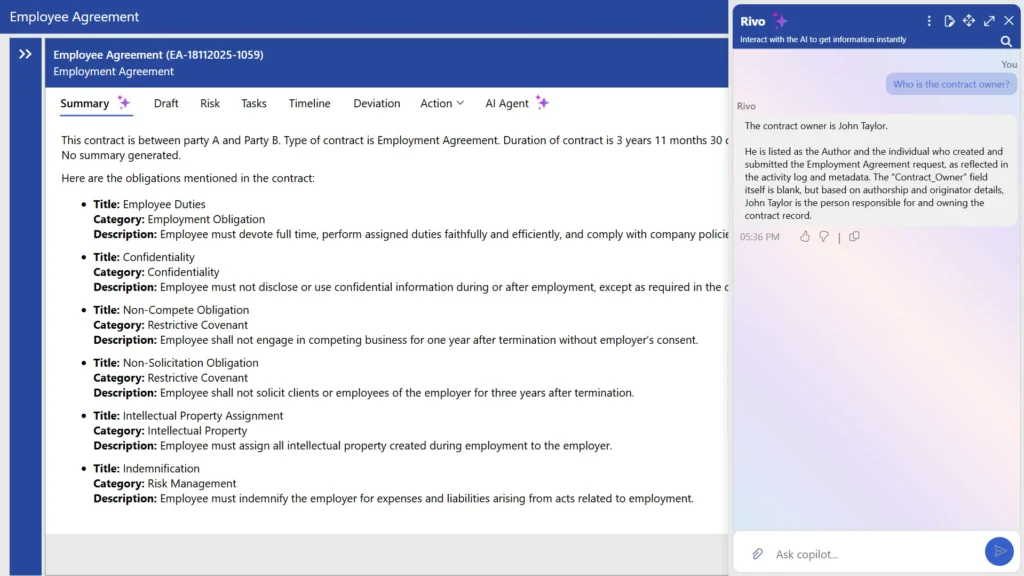
Government contracts are often long and detailed, making it difficult to quickly find key information. AI-powered summaries highlight important clauses, obligations, timelines, and conditions in a short and clear format. A study by Thomson Reuters states that professionals expect AI to save around 5 hours per week, which adds up to nearly 240 hours a year, with an average value of $19,000 per professional.
This feature of contract management for government helps legal teams, project managers, and vendors quickly understand contracts without reading every page.
2. Automated Approval Workflows
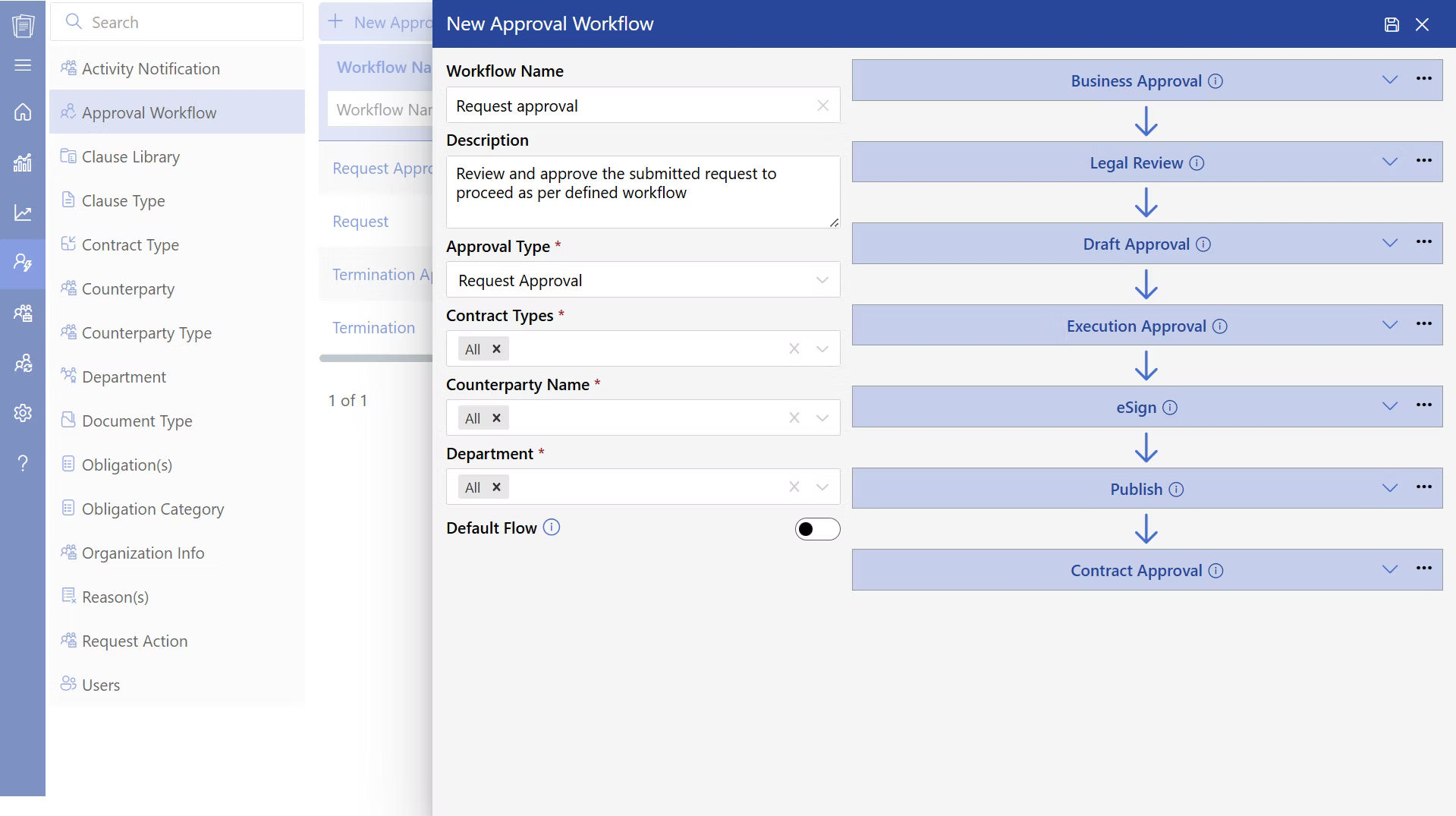
Contracts need to move through legal, finance, and departmental approvals in the right order. Automated workflows send contracts to the correct person at each stage. According to Deloitte, smart automation can cut document routing time by 75 to 95%. Contract management for government not only speeds up approvals but also reduces manual errors and ensures no step in the process is missed.
3. Negotiation and Redlining Tools
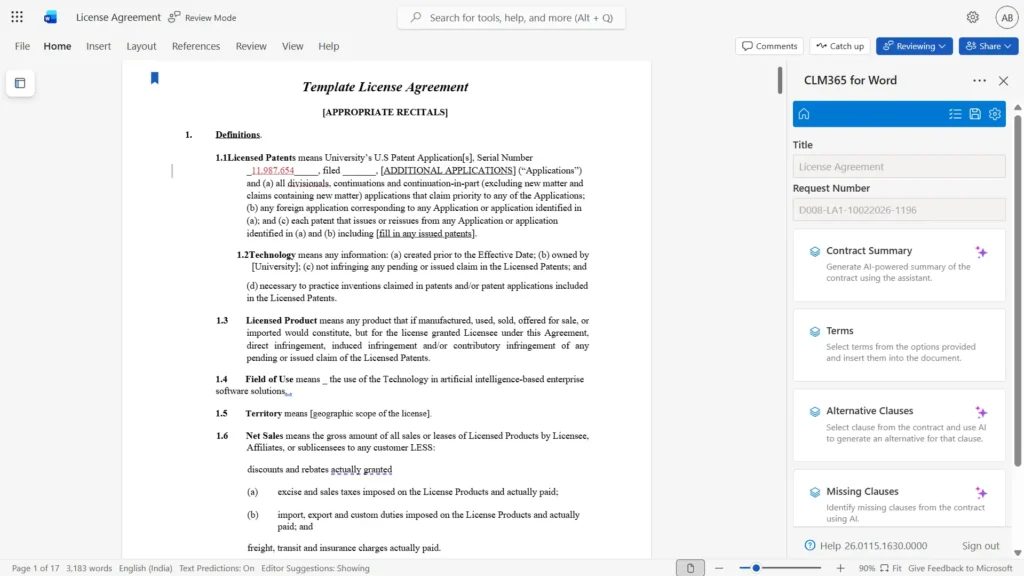
Drafting, reviewing, and negotiating are the most time-consuming parts of contract work. Bloomberg Law found that 62% of professionals spend more than half their time on these tasks. A proper Contract management for government agency tracks all changes, comments, and updated terms in one place, so nothing is lost between versions.
4. Full Audit Trail
Every action taken on a contract from drafting and editing to approvals and final signing is automatically recorded in the system. Contract management for government agency creates a detailed, time-stamped history of who did what and when. Such transparency is invaluable during audits, compliance checks, or legal reviews, as contract management software for government eliminates the need for manual tracking and ensures complete accountability.
5. Role-Based Access Control
Different teams require different levels of access. Legal teams can edit and review contract clauses, finance teams can view cost and payment details, and vendors can access only what’s necessary for signing. A contract management software for government with roles-based security ensures that sensitive information is protected while still allowing smooth collaboration across departments.
6. Renewal Alerts and Deadline Notifications
Automated reminders notify teams well in advance of upcoming renewals, expirations, or key milestones. Contract management software for government helps avoid missed deadlines, prevents unwanted auto-renewals, and gives teams enough time to renegotiate terms or make informed decisions without last-minute pressure.
7. Centralized Contract Repository
All contracts whether active, expired, or archived are stored in one secure digital location. With powerful search and filtering options, teams can quickly find any document they need without relying on scattered emails or shared folders. This improves efficiency and ensures better document organization.
8. Version Control
Every update made to a contract is saved as a new version. Teams can compare changes, review earlier drafts, and track how the contract has evolved over time. This supports better record keeping and clarity. It also helps avoid confusion when multiple stakeholders are involved.
9. Contract Amendment
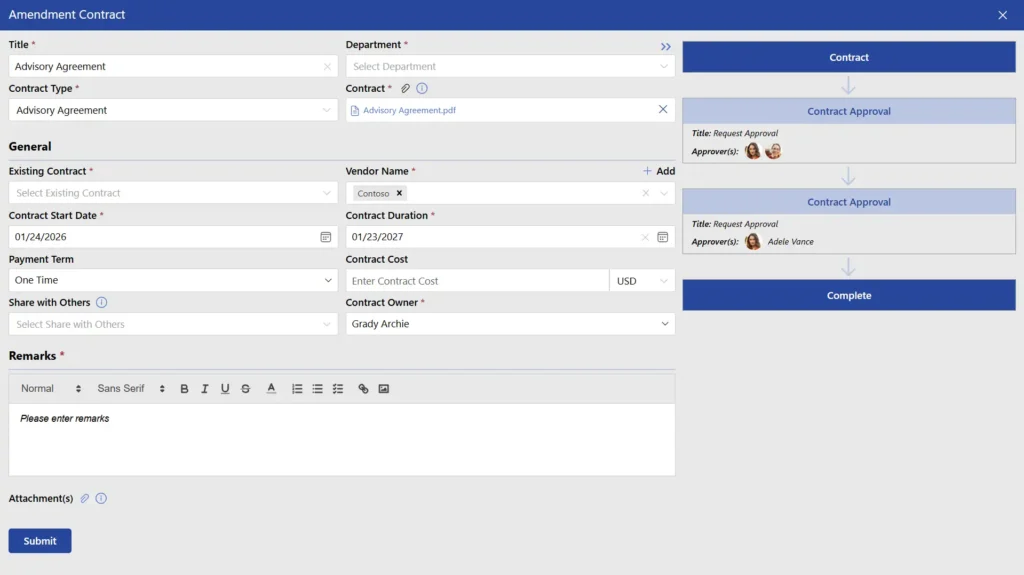
Contracts often need updates during their lifecycle. Instead of creating a new agreement, amendments can be added to record changes in scope, timelines, or terms. These updates stay linked to the original contract, giving a full view of all changes. This ensures that all contract modifications are properly documented and easy to track.
10. Electronic Signatures
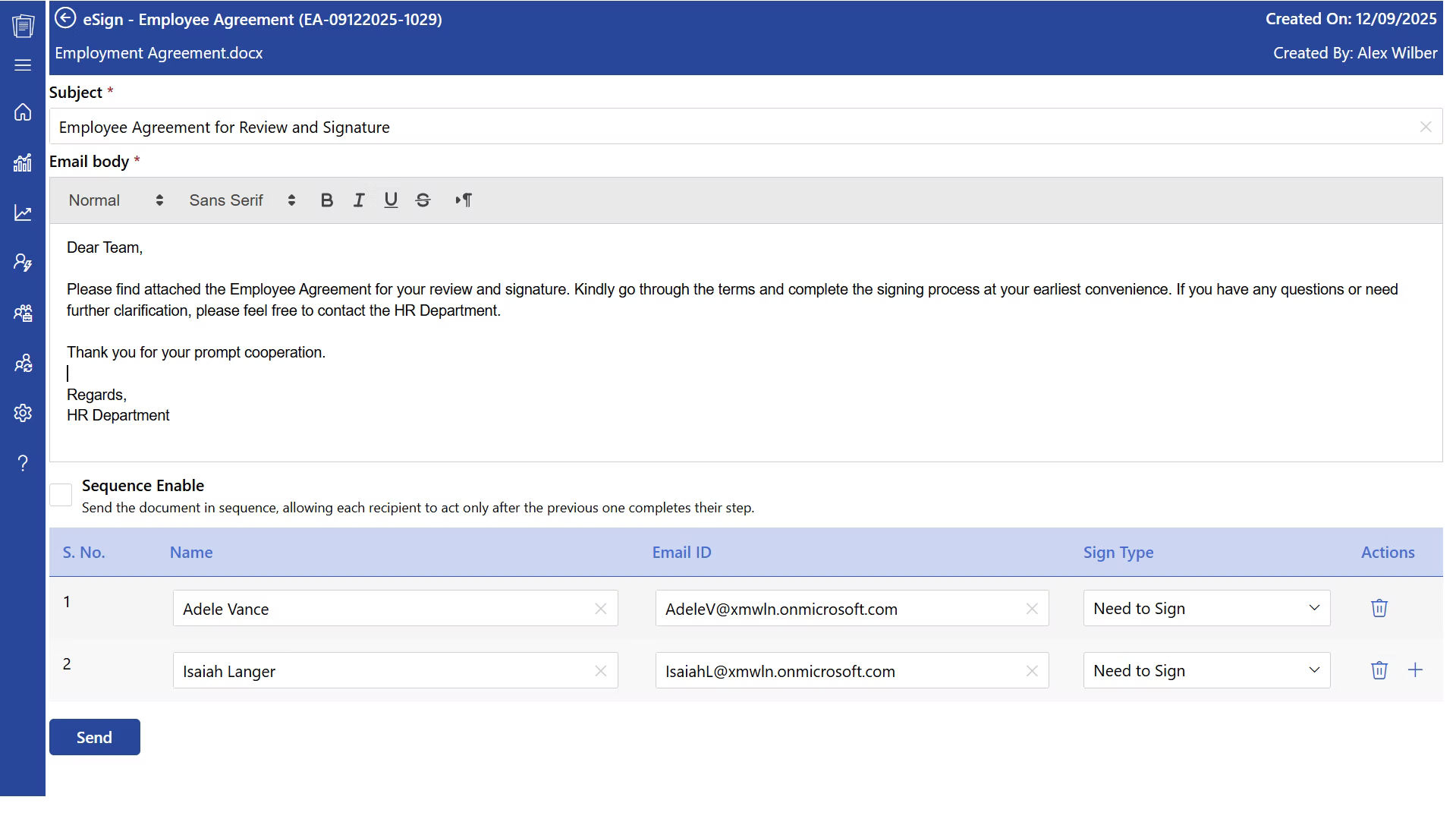
Contracts can be signed digitally, eliminating the need for printing, scanning, or physical paperwork. This speeds up the signing process, especially for remote teams or global stakeholders. With nearly 95% of organizations already adopting or planning to adopt e-signature solutions, digital signing has become a standard practice. All signed documents are automatically stored within the system, ensuring easy access and secure record-keeping.
Best Practices to Implement While Managing Government Contracts
Using the right software is only part of the picture. These practices help agencies manage contracts more effectively day to day.
1. Keep Contract Data Current
Review contract information on a regular schedule at least quarterly. Remove outdated versions from active use. Verify vendor details and payment terms periodically to make sure the information teams rely on is accurate.
2. Track Key Dates
Monitor expiry dates, renewal windows, and review checkpoints. Set internal alerts well in advance so teams are never caught off guard by an approaching deadline.
3. Set Clear Approval Structures
Assign clear approval responsibilities for each stage of the contract lifecycle. Avoid situations where it is unclear who has authority to approve a change. Maintain records of all approvals for audit purposes.
4. Document Every Change
Record the reason behind each change, not just the change itself. Keep previous versions accessible. Link all amendments to the original contract so the full history is visible in one place.
5. Monitor Performance Against Contract Terms
Track whether vendors and internal teams are meeting the obligations set out in the contract. Review contract performance, service levels, and agreed outputs. Document any issues and how they were resolved.
What to Look for in Government Contract Management Software?
CLM 365 is designed to work natively within the Microsoft ecosystem, integrating smoothly with tools like Microsoft SharePoint, Microsoft Teams, Microsoft Outlook, Microsoft Copilot, Power BI, and Microsoft Power Automate. This enables teams to handle contracts without switching between multiple platforms, keeping everything within their daily workflow.
- CLM 365 uses AI-powered workflows to automate approvals, track obligations, and ensure compliance while reducing manual work and errors.
- It combines enterprise-grade security with a simple, user-friendly interface for both SMBs and large enterprises.
- Backed by SOC 2 compliance, Microsoft certifications, and Microsoft Solutions Partner status, ensuring a secure and trusted system.
- Fully supports GCC and GCC High environments, meeting advanced security needs for government and regulated industries.
Best for: Small to mid-sized businesses and enterprise organizations aiming to modernize and simplify their contract management processes.
What makes CLM 365 unique
CLM 365 stands out with its Zero Trust security approach, AI-powered capabilities, and user-focused design. Unlike many platforms, it keeps all contract data within the organization’s own SharePoint environment, ensuring full control, higher security, and better data governance.
Conclusion
Government agencies operate within strict legal, financial, and accountability frameworks. Contracts are more than just documents they shape budgets, service delivery, and the execution of public initiatives.
As the volume of contracts, vendors, and compliance requirements continues to grow, adopting contract management software is becoming essential for both local and national organizations to stay efficient and in control.
Get started today with CLM 365, Start a 14-day free trial.
Frequently Asked Questions
Can we track who approved a contract and when?
Yes, Every action is recorded in an audit trail, providing visibility into approvals, edits, comments, and contract history.
How can we quickly find old contracts without searching through folders and spreadsheets?
Advanced search capabilities allow users to find contracts by vendor name, department, contract value, keywords, dates, or contract type within seconds.
How do we manage contract amendments and change orders?
Amendments and change orders can be linked directly to the original agreement, creating a complete contract history for easier tracking and reporting.
How do government agencies reduce the risk of missing compliance requirements in contracts?
Compliance is often the biggest concern for public sector organizations. Missing regulatory obligations can result in audit findings, penalties, and reputational risk.
How can we measure vendor performance against contract terms?
Government agencies can measure vendor performance by tracking contract deliverables, deadlines, service levels, compliance requirements, and milestones. A contract management system centralizes this information, making it easier to monitor performance, identify issues early, and make informed renewal decisions.






















