

Are you finding it difficult to manage contracts across emails, folders, and spreadsheets?
All your contract approvals can be routed automatically to the right department heads.
Users can create contracts using pre-approved templates and clause libraries.
Manage the entire contract lifecycle, from drafting and review to signing and renewal, in one place.
Use AI to review contracts, identify potential risks, and extract key terms and obligations.
CLM software refers to tools that help organizations manage contracts from creation and review to approval, signing, and renewal.
When contract information is scattered across different systems, teams may struggle to find the latest versions, check contract approval status, and track important dates.
In this blog, we will look at what the software is, how it works, and how businesses use it to manage agreements at different stages.
What Is CLM Software?
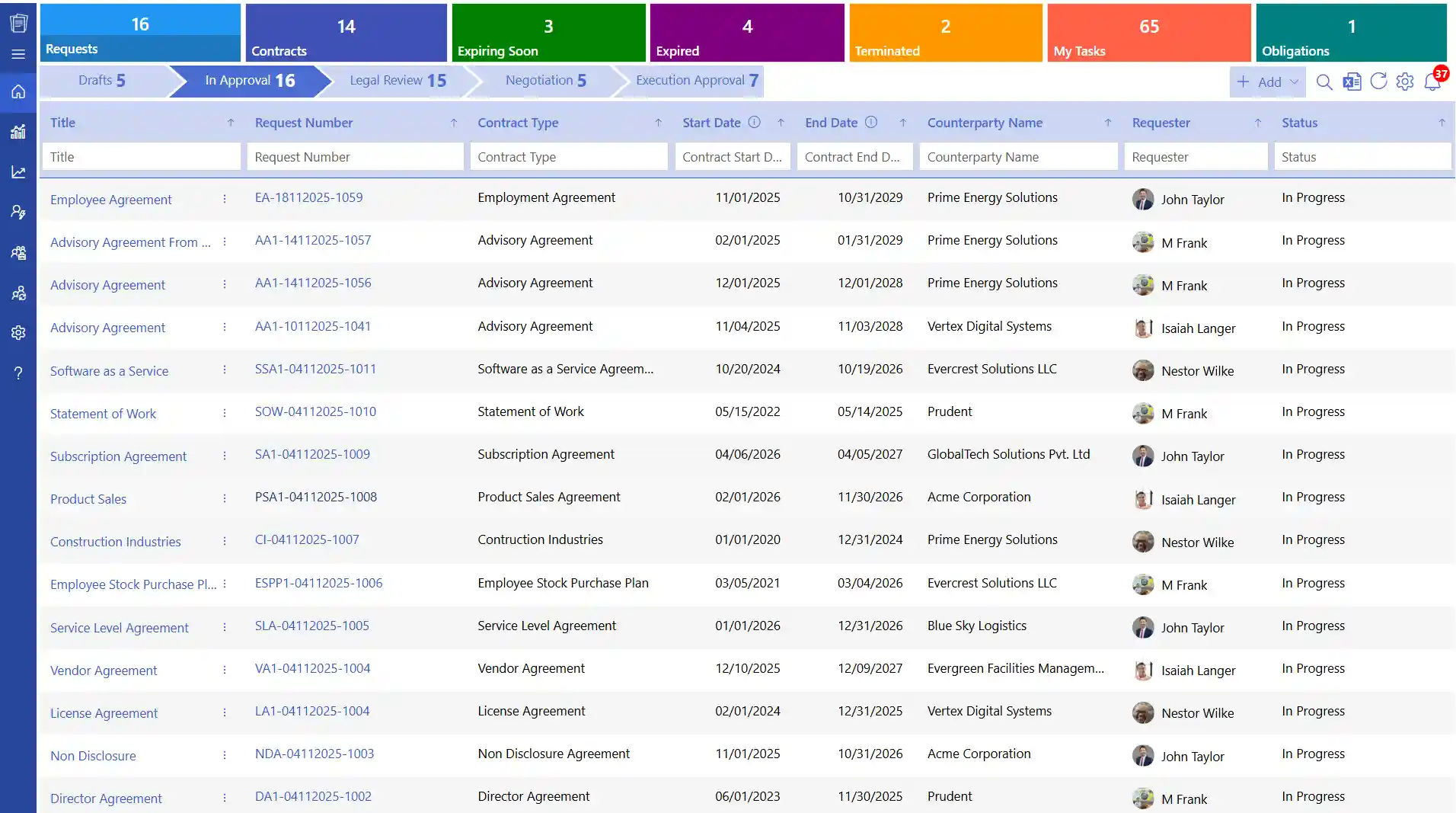
CLM software is a digital tool that manages the entire contract lifecycle, from the first request and document preparation to review, approval, signing, renewal, or termination. It brings contract-related activities, including document management, approval workflows, deadline tracking, and reporting, into one centralized system.
It helps teams check the current status of agreements, access the latest document versions, and monitor contractual liabilities and deadlines throughout the agreement period.
How CLM Software Works Across the Contract Lifecycle?
It helps manage contracts with a well-defined and structured lifecycle. It assists teams in developing, reviewing, approving, signing and tracking contracts within a single system.
Step 1: Contract Request
Teams submit requests with details such as contract type, parties involved, contract value, and deadlines.
Step 2: Drafting
It uses approved templates and standard clauses to help legal teams prepare contracts consistently.
Step 3: Review and Negotiation
Legal, finance, and business teams review terms, suggest edits, share comments, and use AI to summarize key clauses.
Step 4: Approval
The system routes contracts to the right approvers based on company rules, contract value, and risk level.
Step 5: Execution
CLM software supports electronic signatures, allowing parties to sign digitally. Signed agreements are stored in a central repository.
Step 6: Obligation Tracking
Teams track payment terms, contract deliverables, milestones, and deadlines linked to each agreement.
Step 7: Renewal or Closure
Teams receive contract reminders about contract expiry and renewal dates, review past agreements, and decide whether to renew, extend, or close them.
Why switch between tools to manage your contracts?
Manage contracts using your existing Microsoft 365 environment, with integrations for Teams, Outlook, and SharePoint.
Difference Between Traditional and Enterprise CLM Software
Traditional contract management involves handling agreements through emails, files, and shared folders. Enterpris software brings contract information into one platform, making it easier to monitor progress, access documents, and manage agreements.
Key Differences at a Glance
Aspects | Traditional Method | Basic Free Tools | Enterprise CLM Software |
Contract Storage | Spread across emails and drives | Stored in separate cloud folders with limited organization | Centralized, searchable repository |
Drafting Method | Manual edits in documents | Basic document templates with limited standardization | Template-driven drafting |
Approval Process | Email-based follow-ups | Manual sharing and basic collaboration tools | Department based approval workflows |
Version Control | Multiple copies with unclear history | Limited version tracking with file duplication issues | Complete version tracking |
Risk Identification | Manual legal review and consumes time | Minimal risk visibility and no automated checks | AI-assisted review process |
Reporting | Limited or manual reporting | Basic tracking with limited insights | Real-time dashboards |
Scalability | Difficult to manage at volume | Works only for small teams and limited contracts | Built for enterprise growth |
With manual processes, your team handles every contract step. With automated workflows help manage the process from start to finish.
Key Features of Enterprise CLM Software
It helps teams manage large volumes of contracts with features for document storage, drafting, approvals, tracking, and compliance. Key features include.
1. Centralized Contract Repository
According to EY, 90 percent of contracting professionals report that they have difficulties in attempting to find contracts. A good system addresses this by having all contracts in a contract repository. Every contract has the information on the type of contract, date of commencement, expiry date, owner, and value.
2. Redlining & Draft Comparison
Compliance is a major challenge for organizations, with 43% identifying it as a significant contract-related concern, according to Zoho Contracts. Enterprise CLM software records contract documents, approvals, and important activities in one place. These records help organizations check whether agreements follow internal policies and applicable regulatory requirements.
3. Clause Library
With 84% of legal professionals expecting greater use of standardized templates worldwide, having a well-organized clause library has become an important part of contract creation. CLM system software gives teams access to pre-approved templates and legal clauses maintained by the legal department. When creating a new agreement, users can select a suitable template based on the contract type.
4. Automated Workflows & Approvals
An EY survey revealed that while 70% of organizations have a formal plan for using contract technology, 99% still lack the data and tools needed to improve their contracting processes. This shows that having a strategy alone is not enough to address everyday contract management challenges. Automated contract management can help close this gap by sending contracts to the right people and reduces manual follow-ups.
5. Redlining & Draft Comparison
CLM software works with MS Word allows teams to compare contract versions and review edits in one place. Users can see what changed, who made the edits, and when they were made. This makes contract redlining easier to manage, allowing teams to review clause-level changes directly in Word while keeping track of previous versions.
6. AI-Powered Contract Review & Insights
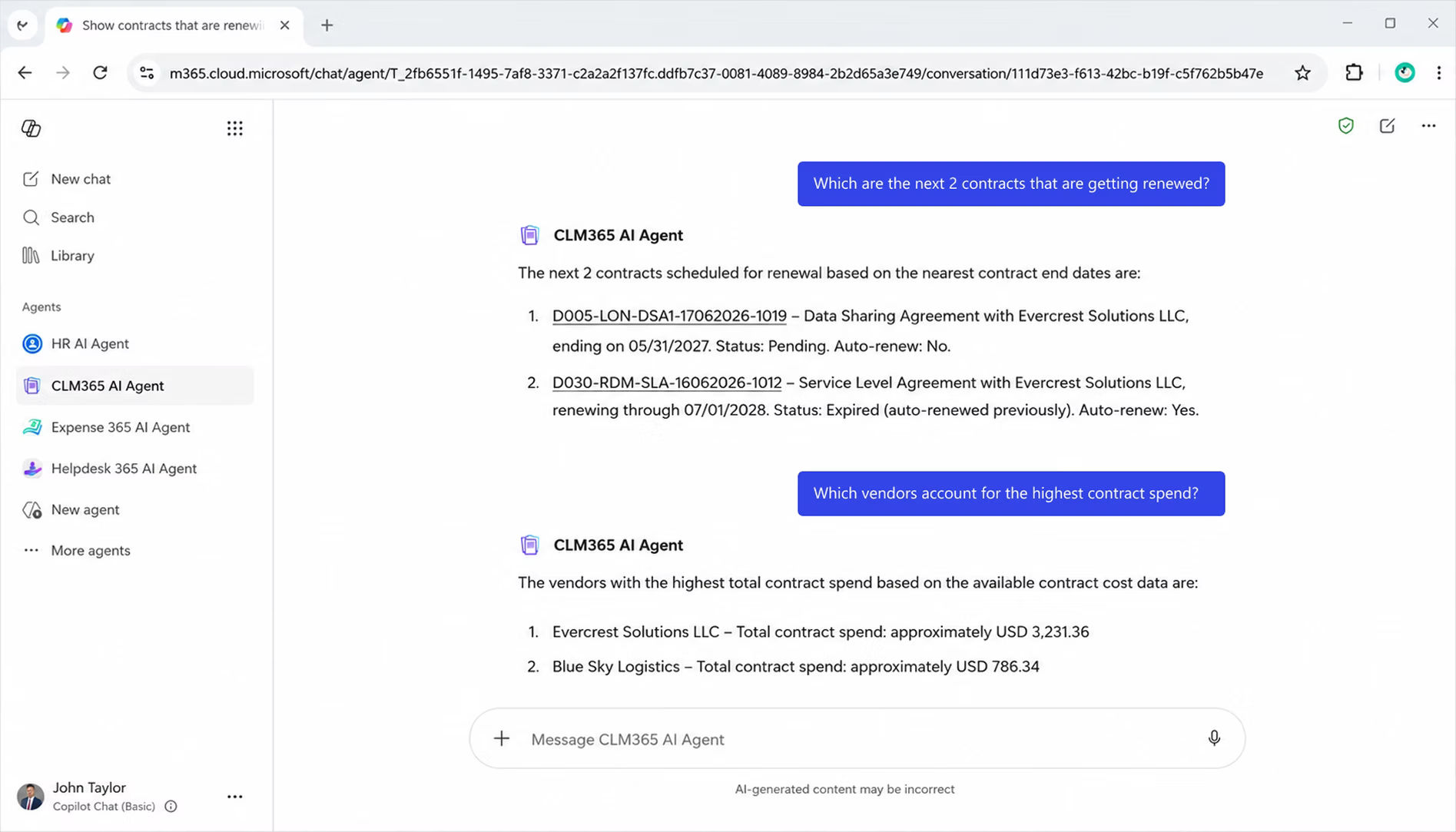
A Deloitte and DocuSign study reported 36% efficiency gains through time savings and shorter contract cycle times. Contract analysis software can help legal teams review agreements by summarizing key terms, highlighting risky clauses, and suggesting alternative wording. This allows teams to identify potential issues faster and focus on making informed decisions.
7. Digital Signatures
Enterprise CLM software also facilitates the use of digital signatures whereby contracts can be signed electronically by all parties. This minimizes the time wastage in printing, scanning or even hand signing. Contracts signed automatically become official records with timestamps and details of the signers and are easily accessible in the future.
8. Obligation & Renewal Management
It helps teams monitor responsibilities such as payments, deliverables, and renewal deadlines. Automated reminders alert users about upcoming dates, helping them manage their commitments and act on time. Learn more about contractual obligations.
9. Contract Amendment
CLM software allows teams to update existing agreements when business needs change. Users can revise clauses, pricing, dates, or other terms without creating an entirely new contract. Each amendment is recorded in the version history, showing what changed, who made the update, and when it happened. Read more about contract amendments.
10. Reporting & Contract Visibility
Contract dashboards provide an overview of agreement status, pending approvals, upcoming renewals, and potential risks. These reports help managers understand contract activity, identify delays, and make informed decisions based on contract data.
Why switch between tools to manage your contracts?
Manage contracts using your existing Microsoft 365 environment, with integrations for Teams, Outlook, and SharePoint.
Benefits of Using Enterprise CLM Software
Managing hundreds of contracts across different teams can get complicated. The software helps businesses handle these tasks in one place, so teams can spend less time on manual work and more time on important decisions.
1. Get Contracts Approved Faster
Waiting for approvals can delay business deals. CLM software routes contracts to the right people based on predefined rules, helping teams move agreements from drafting to signing faster. Legal, finance, and business teams can review contracts in one place instead of relying on lengthy email chains and repeated follow-ups.
2. Know the Status of Every Contract
Have you ever contacted several people just to find out whether a contract was approved? The software gives teams a clear view of each agreement’s status. They can see which contracts need review, are awaiting approval, have been signed, or are approaching expiry without chasing updates.
3. Reduce Legal and Compliance Risks
Different contract formats and inconsistent terms can expose businesses to legal and compliance risks. CLM software provides access to approved contract templates and clauses, helping teams follow internal policies when preparing agreements. It also records edits, approvals, and signatures, giving legal teams a clear history to review when questions arise.
4. Keep Contract Costs Under Control
Missed renewal dates and unwanted automatic renewals can lead to unnecessary expenses. It tracks contract expiry dates and renewal terms, with reminders that give teams time to review agreements and assess their value. Businesses can renegotiate terms, use alternative clauses, or end agreements before deadlines pass.
5. Make Contract Negotiations Easier
Contract negotiation strategies often involve legal, finance, and business teams discussing terms and agreeing on changes. With secure, OTP-assisted negotiation, users can verify their identity before accessing or participating in negotiation activities. This adds an extra layer of security while helping teams discuss terms and work toward an agreement with greater confidence.
6. Stay Audit-Ready
Preparing for an contract audit can be stressful when documents, approvals, and supporting records are scattered across different locations. CLM software stores these records in one place and maintains a history of important activities, including changes, approvals, and signatures.
7. Make Better Decisions with Contract Data
Finding one important detail in a lengthy contract can take time. Contract management system software gives teams easier access to key terms, deadlines, payment details, and contractual responsibilities. Managers can review this information without reading every agreement from start to finish.
Who Uses CLM Software?
Businesses across industries manage contracts with different terms, deadlines, and legal requirements. It help teams organize agreements, track responsibilities, and access important information.
1. Legal
Legal teams use these tools to draft, review, and approve contracts using standard templates. They can also track changes and access records during audits.
2. Manufacturing
Manufacturers manage supplier agreements, pricing terms, and delivery schedules. Contract management for manufacturing helps teams track supplier commitments and plan production.
3. Supply Chain
Supply chain teams manage vendor agreements, delivery terms, and service deadlines. Centralized contract records help them monitor vendor responsibilities and avoid delays.
4. Oil and Gas
Oil and gas companies handle complex agreements with suppliers and contractors. Contract management tools help track approvals, obligations, and records needed for operational and regulatory reviews.
5. Healthcare
Healthcare organizations manage agreements with medical suppliers, equipment providers, and service partners. Teams can monitor contract terms, approvals, and renewal dates.
6. Nonprofit Organizations (NPOs)
Nonprofits manage donor agreements, grants, vendor contracts, and partnerships. Centralized records help teams track deadlines, responsibilities, and renewals.
7. Energy and Utilities
Energy companies manage long-term supplier, maintenance, and service agreements. These tools help teams monitor contract milestones, track obligations, and access records for compliance checks.
One secure platform for the entire contract lifecycle
Simplify the Way You Manage Contracts
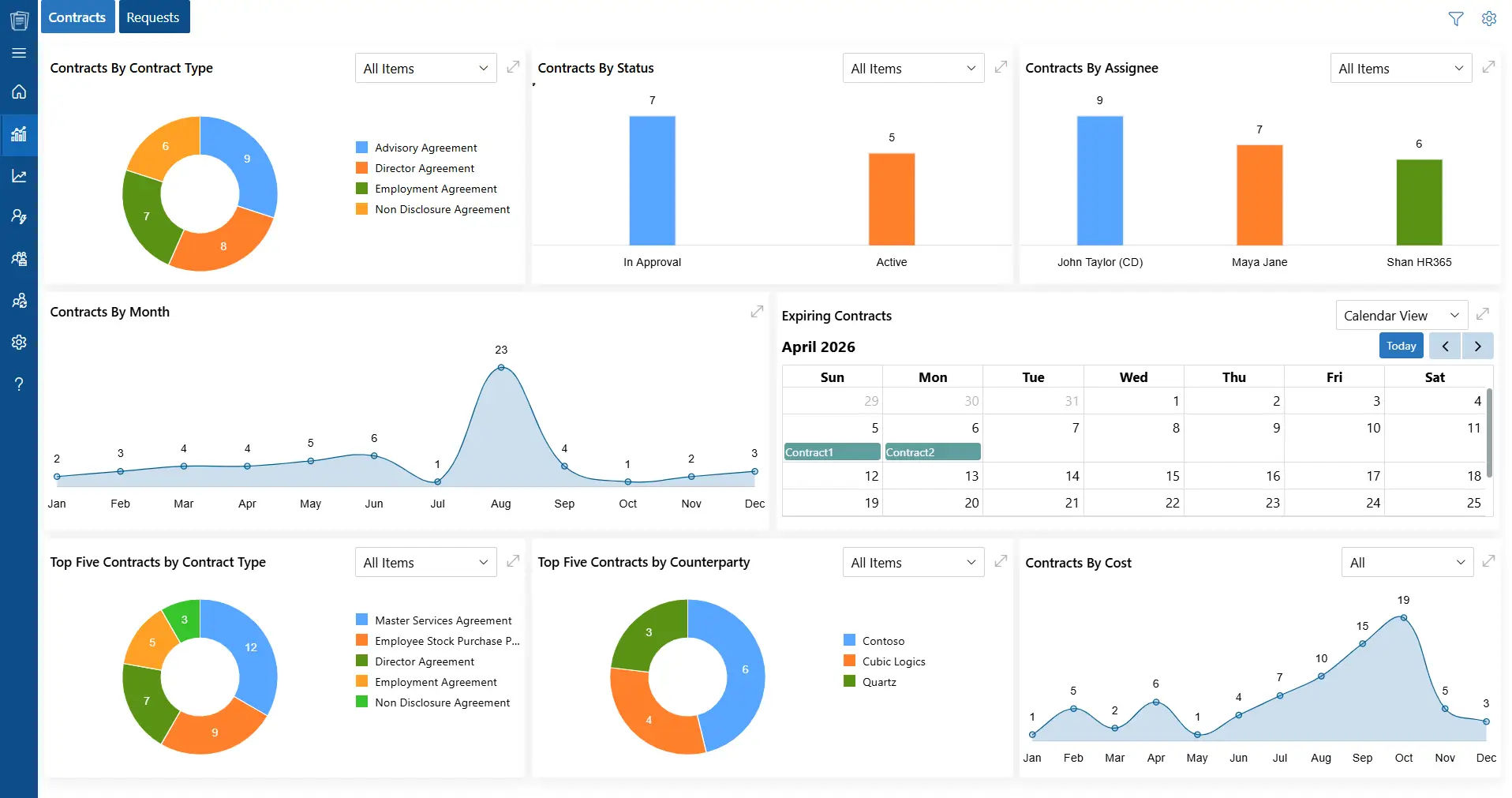
CLM 365 works within the Microsoft ecosystem, helping businesses manage contracts through familiar applications. It integrates with SharePoint, Microsoft Teams, Outlook, Microsoft Copilot, Power BI, and Power Automate, allowing teams to handle contract creation, reviews, approvals, and tracking within their existing workflows.
The platform uses AI-powered workflows to support approval processes, monitor contractual obligations, and track compliance requirements. It also records contract activities, giving teams a clear history of decisions and actions throughout the contract lifecycle.
Built for different business sizes and industries, CLM 365 combines enterprise-level security with a familiar working environment. It is SOC 2 compliant and a Microsoft Solutions Partner and is available through the Microsoft Marketplace.
CLM 365 also supports Microsoft GCC and GCC High environments, making it suitable for organizations that operate in specialized government cloud environments and have specific security and compliance requirements.
Ensuring Data Security in AI-Powered Contracting
Contracts contain sensitive legal, financial, and business information, making data protection essential when using AI for contract analysis.
It operates within the Microsoft 365 ecosystem, allowing organizations to manage contract data within their existing environment while applying configured access controls and governance policies.
CLM 365 does not send contract data to ChatGPT by default. The handling of contract information depends on the AI provider and configuration selected by the organization.
Businesses should review the provider’s data usage policies to understand whether contract content is retained or used for model training. This helps legal and contract teams assess AI capabilities while maintaining appropriate security and governance controls.
Hear from Our Delighted Clients
CLM 365 has made contract reviews faster and more efficient with AI-powered contract summaries. It helps teams quickly understand key terms, obligations, and potential risks, reducing manual review and enabling faster, more informed decision-making.
Conclusion
Every contract carries a business commitment. But when agreements sit across emails and folders, approvals get delayed, deadlines slip, and important details get missed.
CLM software gives your team one place to manage contracts, track obligations, and see what needs attention.
Explore how SharePoint contract management can help your team manage agreements, track deadlines, and maintain compliance with greater control.
FAQs
How can remote teams manage contracts effectively?
Remote teams can access agreements, review terms, request approvals, and track contract progress through a shared digital platform.
Is contract management limited to legal teams?
No. Legal, procurement, sales, finance, and management teams can all manage agreements, review terms, and handle their assigned responsibilities.
How is confidential contract information protected?
Digital platforms may use encryption, user permissions, and activity logs to protect sensitive documents and limit unauthorized access.
How can teams monitor their agreements?
Storing agreements in one location helps teams find documents, check their progress, and track important dates, obligations, and renewals.
Can CLM 365 restrict access to specific contracts?
Yes. CLM 365 lets organizations assign user permissions to control who can view, edit, approve, or download contract documents.


























